

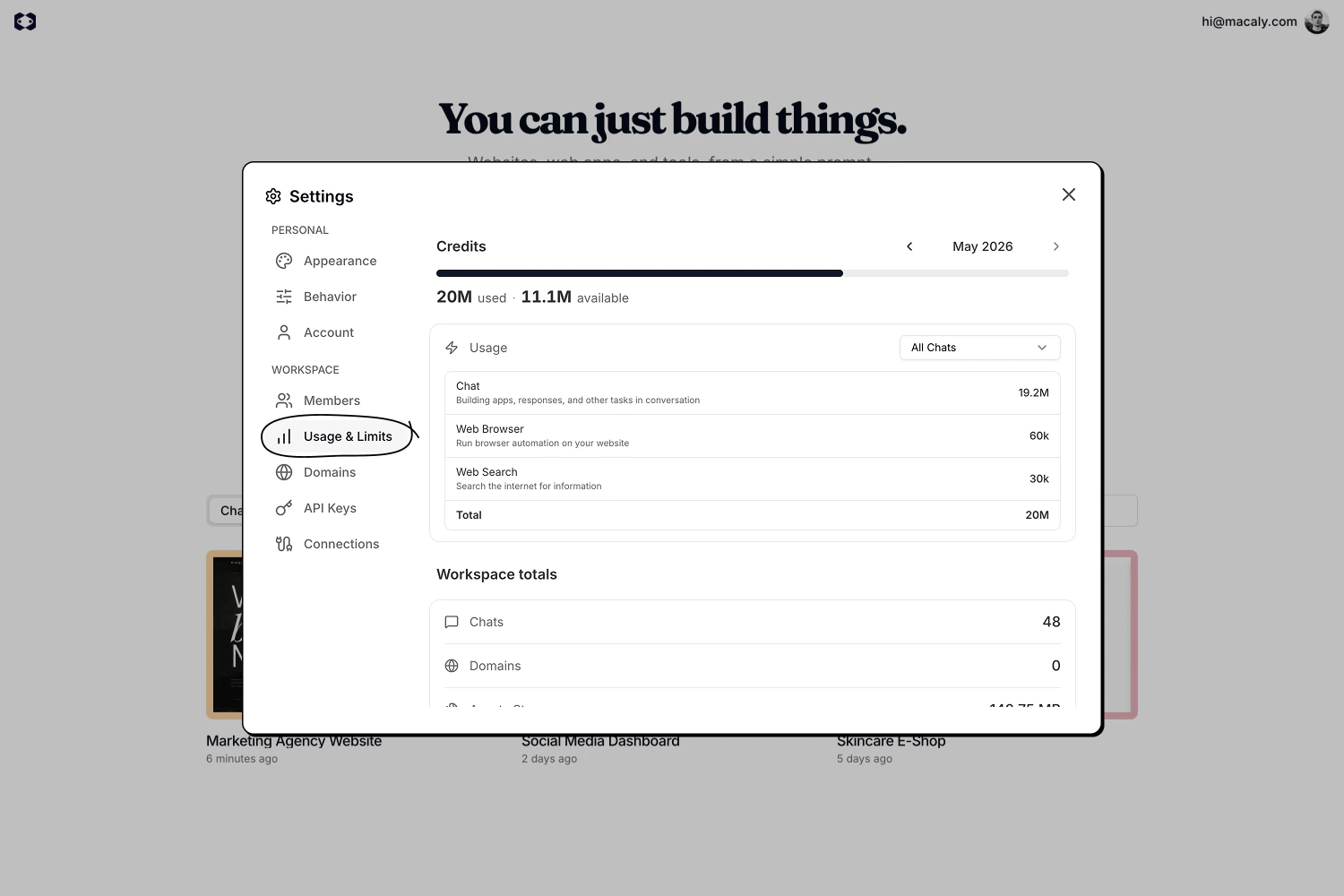
Credits
The top section shows how many credits you’ve used during the current billing cycle and how many are still available. A month picker lets you view past cycles. Below the balance, a detailed breakdown shows how credits are spent across different agent tasks, such as building apps, generating images, or analyzing YouTube videos. You can filter the breakdown by a specific chat, or leave it on All Chats to see the entire workspace.Workspace totals
This section shows resource usage across all chats in the workspace:- Total chats: The number of chats created in the workspace.
- Domains: The number of custom domains connected. Free subdomains (
*.macaly.appor*.macaly-app.com) are not included in this count. - Assets storage: Total space used by files and images across all chats.
Plan limits
Depending on your plan, this page also shows how much of your plan’s limits you are using:- Cloud actions (Free plan): The Cloud actions used this month by external AI agents through Macaly Cloud. The allowance resets on the 1st of each month (UTC).
- Published apps: The number of apps you have published, compared with your plan’s limit.
- File storage: The space used by your files, compared with your plan’s limit.
- Traffic allowance: The website traffic allowance of your plan. It is an allowance only. It is not metered, enforced, or charged today.
Plan limit warnings
On the Free and Starter plans, a bar at the top of the home screen and inside chats warns you when you’re close to a plan limit or over it. Everyone in the workspace sees it, and it can’t be dismissed. Pro, legacy Hosting, and whitelabel workspaces don’t see it. The bar only informs. It doesn’t block anything by itself. The color shows how close you are:- Amber: you’ve used 80% or more of a limit.
- Red: a limit is reached or exceeded. Published apps are the exception: they turn red only when you have more live apps than your plan includes, for example 3 of 1. Being exactly at the limit (1 of 1) shows nothing.
- Published apps
- File storage
- Cloud actions (Free plan, 100 a month): the bar shows the date they reset.
- Backend calls this month (Free: 50,000, Starter: 100,000)
- Database usage this month (Free: 1 GiB, Starter: 5 GiB)
Published apps over the limit
A workspace can have more live apps than its plan includes, typically after cancelling Pro, a failed payment ending the subscription, or on an older Free workspace. Your apps don’t go offline right away. You get time to choose which one stays live, and the email tells you the exact date.- Email. Owners and admins get an email with a deadline. A reminder follows 3 days before the deadline, and a final one on the deadline day.
- Notice in Macaly. A notice at the top of the screen shows the deadline and which apps stay live. Owners and admins can choose which app stays live from the notice. Members see the notice and should ask an owner or admin.
- Default. If nobody chooses, the app on a verified custom domain stays live first, then the most recently published one.
- Upgrade. You can also upgrade to a plan that includes more published apps.