

New features
Introducing the new Starter plan
Build websites and apps with your own Claude or ChatGPT and publish them on your own domain, without the Macaly badge, with the new Starter plan for $10 a month. Learn more about the new plan
Changes to the Free plan
- Free now includes 1 published app and 100 Macaly Cloud actions a month
- New Free accounts get 1M credits a month. Existing accounts move from 3M to 1M at their next credit renewal
- Apps that are already live stay online, and you can keep updating them. Publishing another app needs a free slot or an upgrade
Other plan changes
- The Usage & limits page now shows your Macaly Cloud actions, published apps and file storage
- You can switch from Pro to Starter at the end of your billing period. All your projects are kept
- The Hosting plan is no longer available to new customers. Existing Hosting plans stay the same
New features
Let the agent set up your cookie banner and privacy policy
Collecting visitor data through analytics, payments, or embedded videos? You can now ask the agent to add a cookie banner and a privacy policy to your site. Powered by Iubenda, both are tailored to the services your site actually uses, and the banner matches your design. Tracking scripts only run once a visitor gives consent.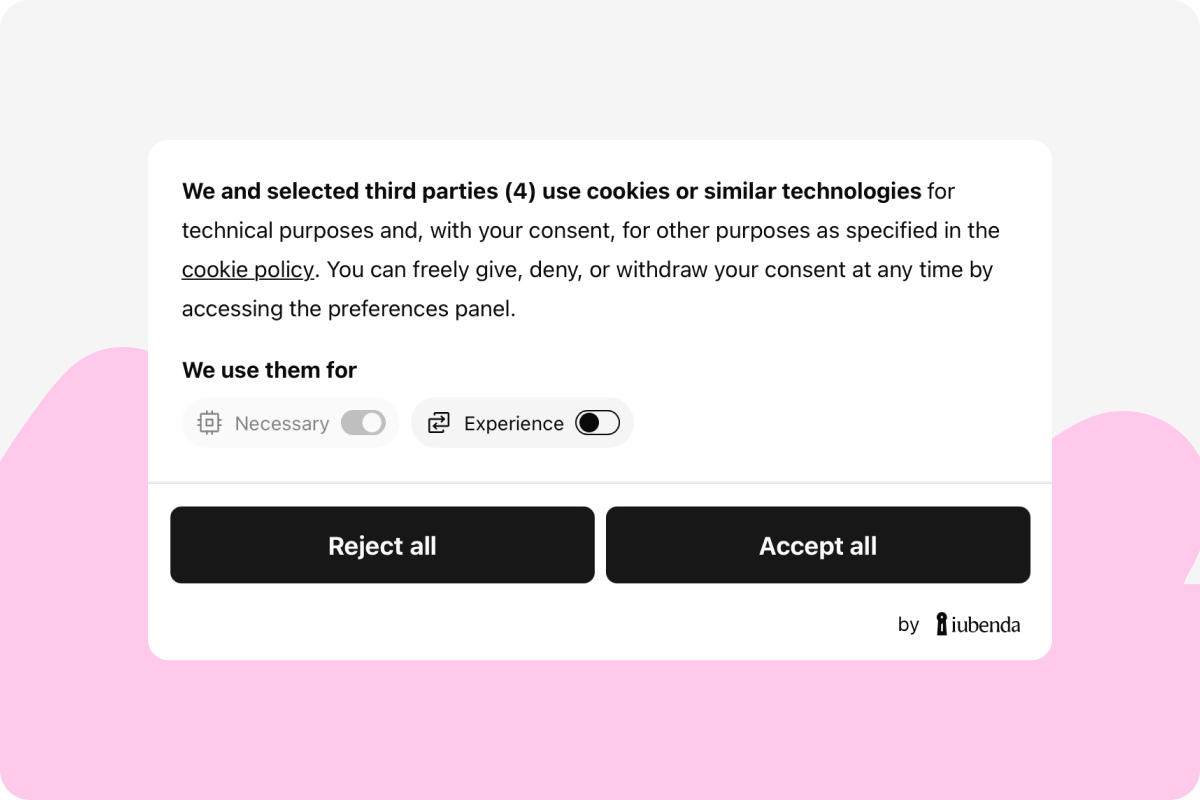
Go live with everything in view
Before you publish, you now see everything in one place: your project’s address, its access settings, and the results of the security, database, payments, and SEO checks. From the same dialog, you can also share your project with the community or unpublish it.The latest models from OpenAI and Anthropic are now available
Macaly now offers the newest models from OpenAI (GPT-6.1 Sol and GPT-6 Luna) and Anthropic (Claude Sonnet 5.5 and Claude Opus 5.5). Pick a model for a specific project, or set one as the default for your whole account.Improvements
- The Macaly interface is now available in Brazilian Portuguese
- Agent actions in the chat now appear in your interface language
- Your project overview on the home page is easier to browse on your phone
- The dialog you see when sharing a project has a fresh look and works better on mobile
- We now protect projects from a known vulnerability in the TanStack framework. If your project is affected, the agent proposes an update and holds off publishing until the issue is fixed
Bug fixes
- When you tried to stop the agent mid-task, the Stop button sometimes didn’t respond right away. The agent now stops immediately
- Fixed an issue that made the editor crash when your browser automatically translated the page
- In some cases, the preview kept restarting even when nothing had changed. It now stays up for as long as you work
- After switching between the Live and Testing database, the preview could show an outdated version. It now rebuilds automatically
- Projects with a large number of files sometimes failed to open with an error. They now load reliably
New features
Bring your project over from Lovable
Started a project in Lovable and want to continue in Macaly? Export the code and database from Lovable and upload them with the Import from Lovable option next to the message box. Macaly turns them into a new project you can keep working on right away.
Improved visual edits
Want to swap two cards or add more space under a heading? In visual edits, you can now move an element to a new spot and adjust its spacing by dragging its bottom edge. The panel is also clearer, with basic and advanced options better organized.Let AI sort and score content in your app
Your app can now sort, score, or match text content by what it means. It can route customer questions to the right team, tag reviews by topic, or rank leads by how relevant they are to you. Tell the agent what your app should sort, and it uses the new AI Classification skill.Improvements
- In the chat, you can now place files right in your message text, where you mention them. On desktop, hover over a file to see a preview
- When something works in the preview but not on your published site, the agent checks the error logs and finds the cause faster
- Projects in the community gallery now have categories, so visitors can easily find what interests them. Macaly suggests a category when you share, or you can pick your own
- If your project has an image for sharing on social media, it’s used as the thumbnail in the community gallery
- When you lock your site with a password, it’s temporarily hidden from the community gallery. Publish it again and it comes back to the gallery too
Bug fixes
- Downloaded source code was sometimes saved as a broken ZIP file. Downloads now complete correctly
- Fixed an issue that made the toolbar disappear in the editor and in shared previews
- Saving visual edits could lose your unsaved changes. All your changes now stay exactly as you made them
New features
Easier sign-in with Google
Let people sign up and sign in to your app with the Google account they already have. Macaly now handles the whole authorization flow for you, so you don’t have to set up anything in Google Cloud.
Protect your site with a password
When your published site is meant only for a client or your team, you can now lock it with a password straight from your project settings. Visitors don’t even need a Macaly account. Available on the Pro and Agency plans.Try out ideas in a separate version of your project
Want to experiment with new features or a new design on your site? Macaly now lets you create variants of your project, each with its own chat. If you like how the changes turn out, publish the variant over your current version, or go back to the original at any time.Use your app from Claude or ChatGPT
Macaly can now turn your app into an MCP server that Claude, ChatGPT, and other agents can connect to. You can ask your AI assistant to create a new user account or mark an order as shipped, without using your app at all.Improvements
- Macaly Cloud is now available for Grok Bot
- The Macaly interface is now available in Danish, Finnish, Slovak, Hungarian, Swedish, and Greek
- If you use Macaly through WhatsApp, you can now see when the agent is working on your task
- Images you generate in Macaly can now have a transparent background, which is useful for logos and icons. The agent also keeps the aspect ratio you ask for, like 16:9 for a banner
- Macaly can now process YouTube videos that run for several hours. Paste a link to a full webinar or podcast and the agent can turn it into a blog post
Bug fixes
- Projects you had not opened for a while could open with an older version of your files. Your latest changes now stay exactly as you left them
- Some published sites showed the text “Made with AI in Macaly” in Google search results, even when the badge was turned off. Republish your site to apply the fix
- Connecting Macaly to your Telegram account sometimes got stuck on “Waiting for your connection”. That’s fixed, and commands like
/helpwork again - When you come back to Macaly in your phone’s browser, you no longer see a “session expired” error
New features
Macaly Cloud lets you build and publish projects straight from Claude or ChatGPT
Add Macaly Cloud to Claude or ChatGPT, describe the website or app you want in the chat, and Macaly handles the database, hosting, domain, and the 70+ skills your project needs to go live.Building and publishing run on your existing Claude or ChatGPT subscription and cost no Macaly credits. Some skills, such as AI features inside your app, can still require credits.Every project is saved to your Macaly account, so you can open it like any other project and carry on editing it there.Learn more about Macaly Cloud
New features
Visual edits, redesigned
Adjust styles, swap images, and rewrite text directly in the live preview. When something is easier to show than to describe, sketch it onto the exact spot you mean. Most edits apply instantly and cost no credits.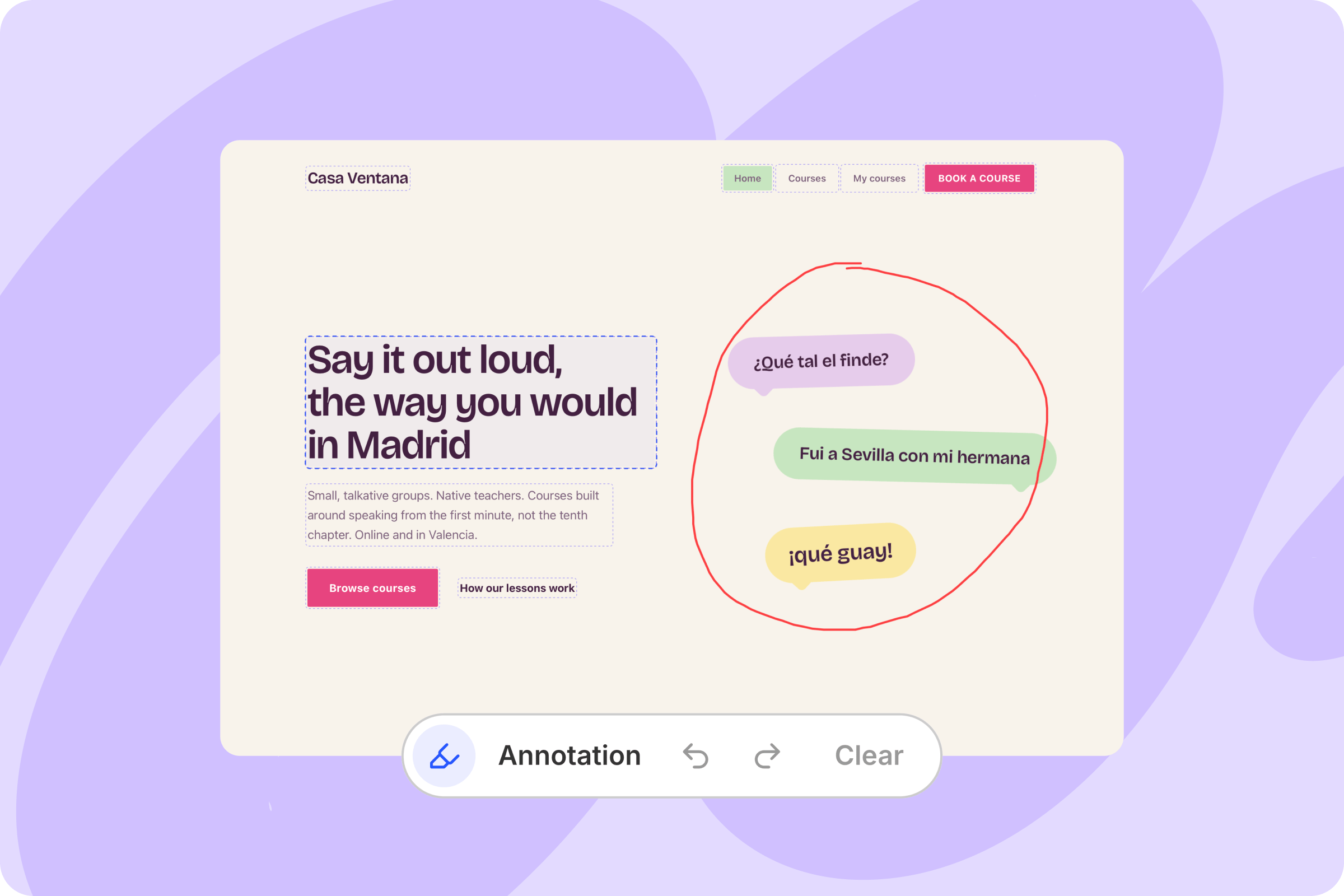
Clients can comment right inside your project (Agency)
Your clients can now leave feedback as comments directly in the preview of the project you’re working on. Reply in the thread, or pass the comment to the agent and it takes care of the requested changes. Available on the Agency plan only.Connect your own tools via MCP
Using a tool Macaly doesn’t integrate yet? If it has an MCP server, add it under Settings → MCP Servers and the agent will use it while building your project.Improvements
- Images, videos, audio, and text files all open in a preview inside Macaly
- The media library has a new “App user uploads” tab for files uploaded by users of your apps
- Image edits can now use other images as references
- GLM 5.3 and GLM 5.3 Flash are now available as EU-hosted models
Bug fixes
- Fixed a bug that made new chats slow to start
- Chats with a large number of tool calls no longer crash the page
- Dates on the GitHub import and domain settings screens now show in the right language
- The agent now sees every action an integration offers, so no action comes back as unsupported
New features
Earn credits for exploring Macaly
You can now earn credits in Macaly for exploring and trying out its features. Add a database, use visual edits, or set up payments, and the credits are added to your account automatically.Each completed challenge also earns you a badge on your public profile, which is where you will find all the rewards and your progress.
New features
A new audit checks your app’s security
Before you publish, Macaly helps you review your project’s security. The new security audit checks how your app handles sensitive data, how sign-in works, and where passwords and API keys are stored. The agent fixes any issues right there. The first check in every project is free, including the fixes that follow.
Share your projects with the Macaly community
Built something you want to show off? Macaly now has public profiles where you can showcase your sites and apps. Projects you showcase on your profile also appear in the community gallery, where other users can browse them.Improvements
- Workspace owners and admins can now change member roles, and ownership can be transferred to another member
- Each project now shows how much database space it takes up and how many backend API calls it makes
- Duplicated projects now have their own database by default, and any project that shares a database with others is labeled as such, with links to the chats involved
- The agent now defaults to replying in the language your Macaly interface is set to
- The Macaly interface is now available in German, Portuguese, and Spanish
Bug fixes
- Chats running Grok 4.5 no longer break when a small image or a GIF appears in the conversation
- Chats with a very long history now open without an error message
- Duplicating a project succeeds even when some of its dependencies fail to install
- Opening a preview in a new tab no longer fails with an Unauthorized error
New features
Build with Macaly from Telegram
Build, edit, and publish your Macaly projects from Telegram, now alongside WhatsApp. Add the Macaly agent to your contacts and send it a message, voice note, or image with your request. The agent finds your project, makes the changes, and sends back a link with a preview.Check out the documentation to see exactly how it works.
GPT-5.6 Sol and Terra are now available
Try OpenAI’s newest models right inside Macaly. In our benchmarks, GPT-5.6 Terra runs faster and cheaper than comparable models from Anthropic. Reach for GPT-5.6 Sol when a task is more complex or demanding.Improvements
- New projects load up to twice as fast, and the agent responds quicker inside existing chats too
- The Macaly interface is now available in Italian
Bug fixes
- Refreshing a project page right after sending a chat message no longer leaves a copy of your message in the input
- If your internet drops while the agent is responding, the chat reconnects instead of cutting the answer off halfway
- Viewing older versions of your app no longer shows the latest version by mistake
New features
A new SEO audit checks your site and suggests fixes
We rebuilt the SEO tab from the ground up. Every time you publish, an SEO audit runs automatically and checks how search engines and AI assistants see your site. If something needs fixing, the agent handles it.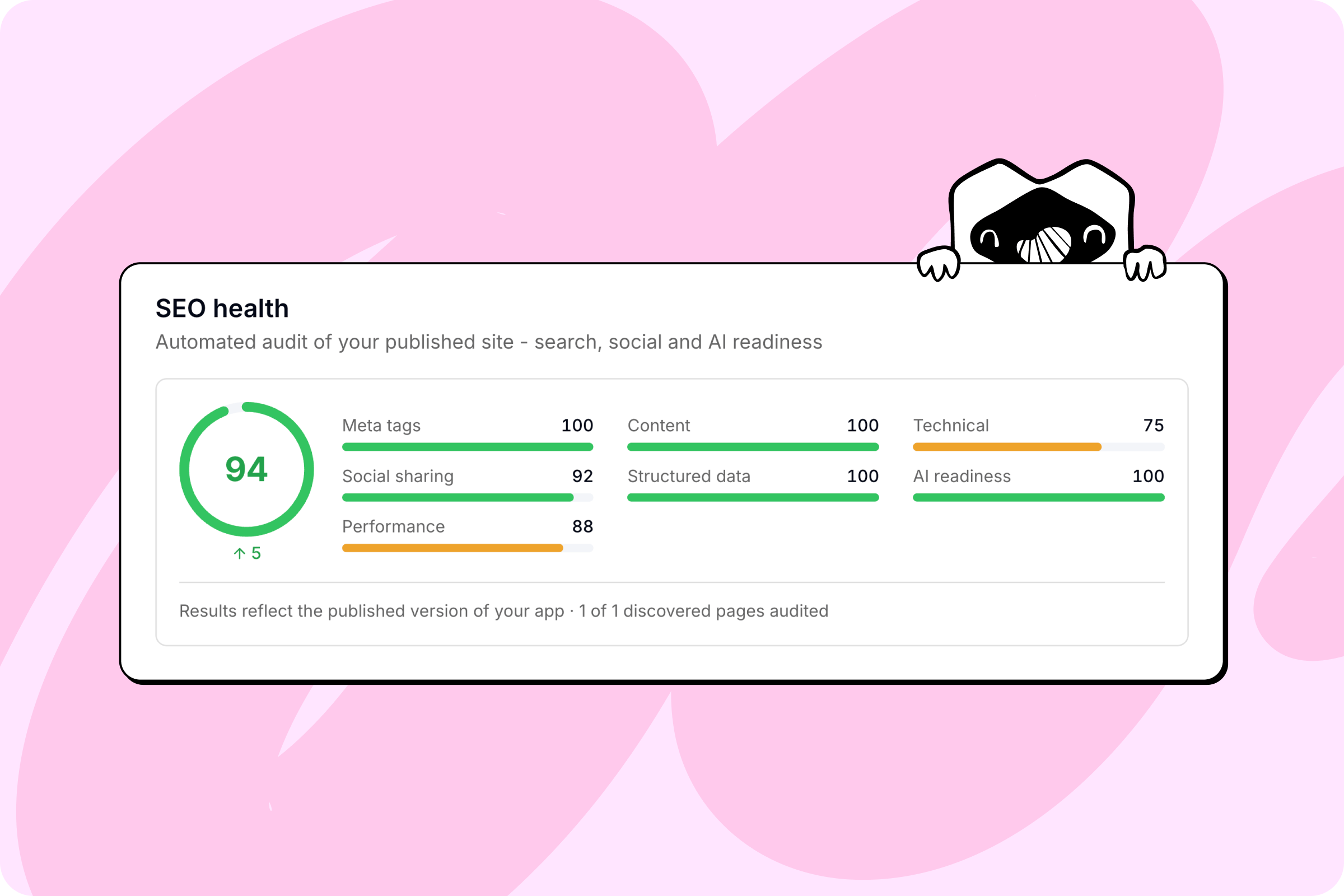
Message the agent while it’s still working
Thought of something after the agent got started? Send a follow-up and it gets folded into the current job, so you don’t have to wait for the previous task to finish. You can also break your idea into a few shorter messages and the agent answers them all at once.Roll back to an earlier version
Something went sideways? You can now browse every earlier version of your project straight from the chat, see it in live preview, and restore it in one click.Improvements
- Copy any chat message in one click, whether it’s the agent’s reply or your own
- Settings → Usage & Limits now shows detailed database usage, including storage and API calls
- Pay for plans and credits in USD, EUR, or CZK
- The Macaly interface is now available in Bulgarian
Bug fixes
- Running
/clearno longer hides your project’s live preview - Publishing a project with large images no longer fails midway
- Long agent tasks no longer stop early when the model takes a moment to respond

New features
Pull data from anywhere on the web
Most of the content you need for a new site already lives somewhere online. Now Macaly can go get it and build it in for you.We’ve partnered with Apify, the world’s largest marketplace of web data tools, with 40,000+ ready-made tools covering everything from Google Maps to LinkedIn to Airbnb.Just tell the agent where your content lives, and it pulls the details, photos, and reviews and turns them into a website, dashboard, or app.For the full details, see our Apify integration guide.
New features
Accept real payments in your projects
Macaly now comes with Stripe built in, so your projects can take real payments, both one-time and recurring.Whether you’re running an online store, selling e-books, or charging for monthly courses, just ask the agent and it creates everything you need — landing pages, product pages, checkout, and confirmation emails. Available across all projects, new and existing.For the full details, see our Stripe integration guide, including how to test payments first and then deploy them to live production.
New features
Introducing a library of 30+ skills
No more describing the same task to the agent over and over. You can now tap into a library of 30+ ready-made skills the agent can run for you. Just type/ in the chat, or click the + button and select “Use skill.”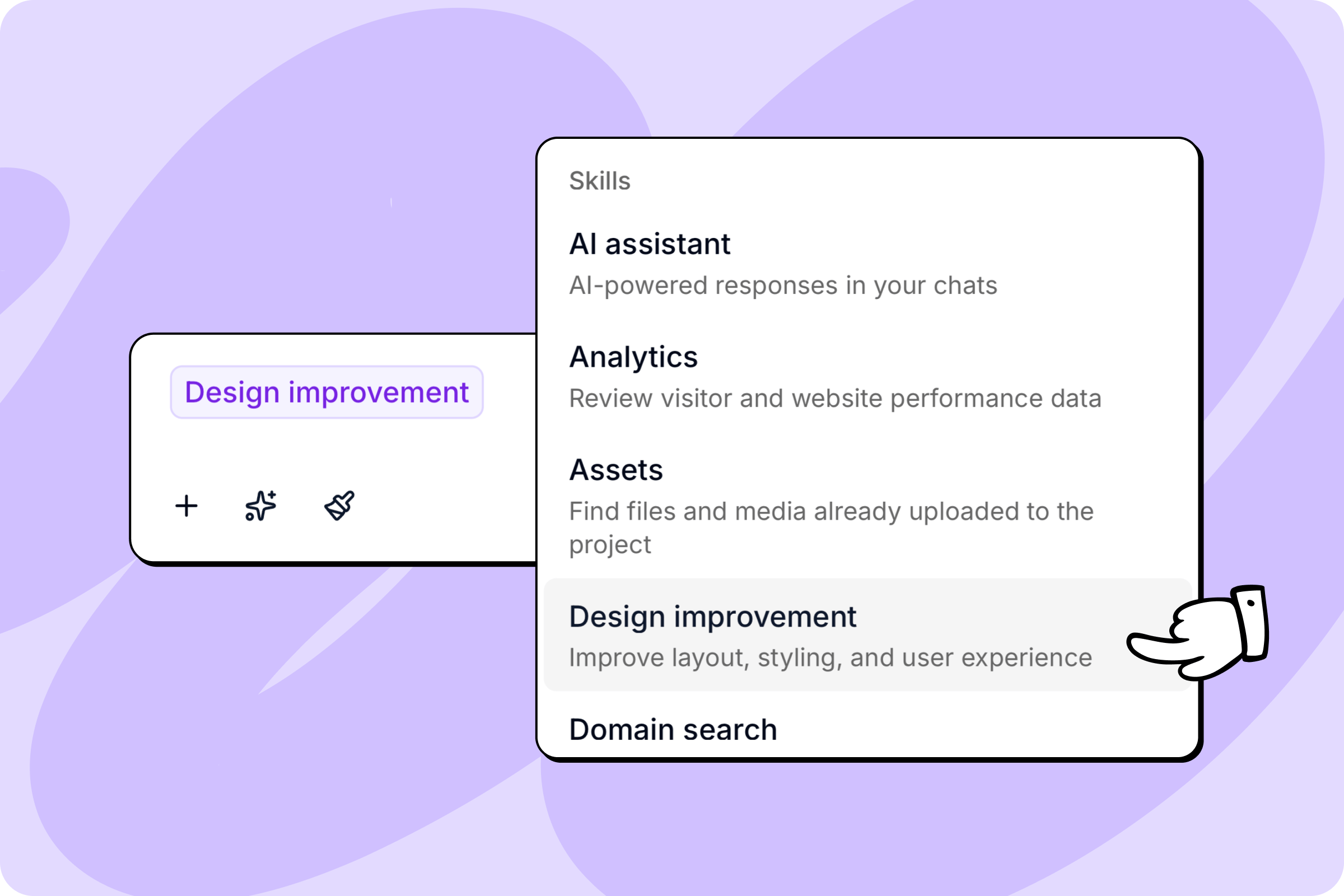
Let the agent review your app’s security
You can now ask the agent to run a security review of your project. It checks key areas — access permissions, handling of sensitive data, API key setup — and suggests fixes on the spot.Multiple workspaces, one invoice (Agency)
You can now link multiple workspaces to a single primary Agency account that shares all your credits. That gives you separate spaces for different teams, clients, or projects, while paying for just one plan.A cheaper model for faster work
Macaly Code is a new model built for speed. It uses fewer credits, so you can fit in more edits, and it’s ideal for smaller changes like tweaking copy or layout. You’ll find it alongside the other AI models in your account or chat settings.Improvements
- Undo and redo now work in the chat input. Press
Cmd + Zto undo your last edit,Cmd + Shift + Zto redo it - When the agent hits an error, you now see a clean error card instead of a wall of red text, and can report it right from there if needed
- Clicking the Macaly logo now takes you back to the workspace your current project belongs to instead of jumping to your default one
Bug fixes
- Publishing large projects with many PDFs or images no longer fails due to a server error
- Pulling large repos from GitHub no longer times out mid-import
- Stopping the agent and immediately sending a new message no longer causes the message to be deleted
New features
Type your own answers to agent questions
When the agent asks you a question mid-build, you’re no longer limited to just clicking the pre-set options. You can now type a custom answer in a free-text field to give the exact direction you want.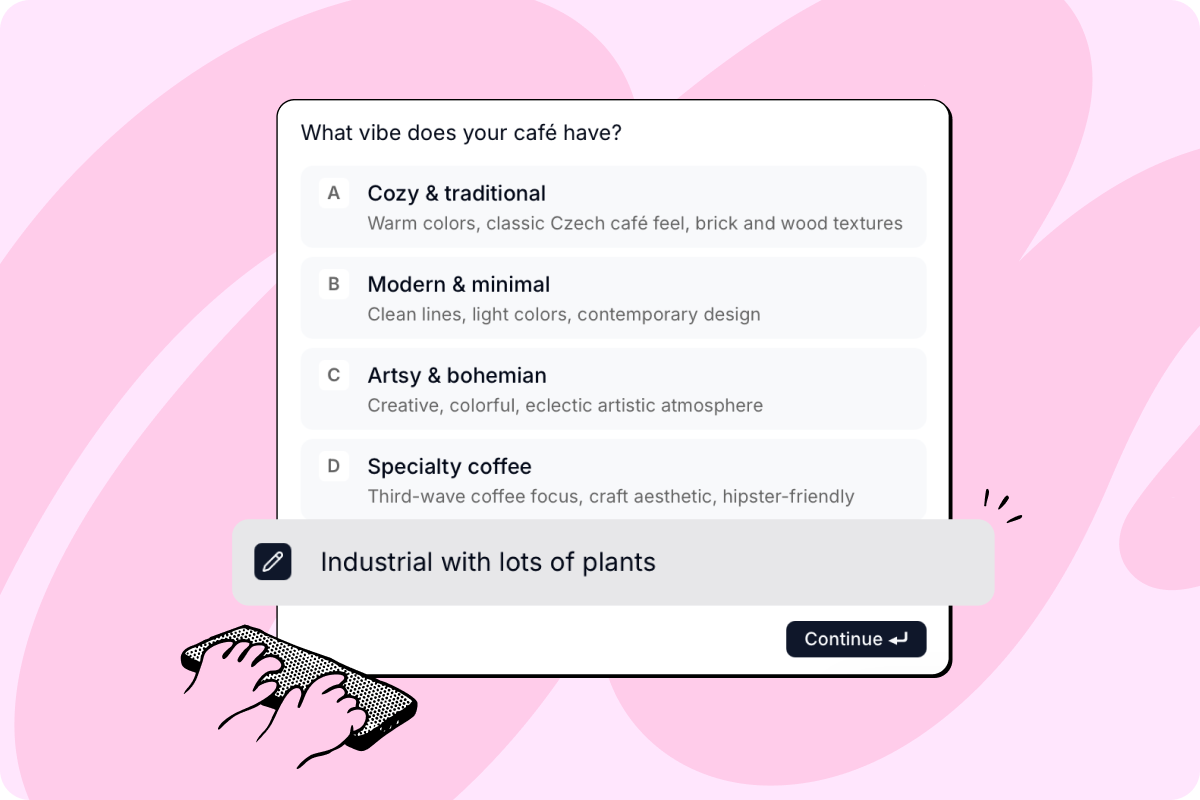
Clearer project duplication
Duplicating a chat is now much more intuitive because you can immediately see what gets copied over to the new project. You can also choose whether the duplicated chat stays connected to the original database.Pin your favorite tabs
You can now pin up to five of your most-used tabs to the top menu in the chat. The rest are kept neatly organized in a simple dropdown menu.Improvements
- Catch up on what’s new in Macaly directly from the user menu, where you’ll find a new “What’s new” item
- Settings no longer open in a modal and now have their own dedicated page with individual URLs for each section
- You can now view your credit usage month by month to easily track how many credits you’ve consumed in a given period
Bug fixes
- Clicking refresh on a custom domain now triggers an instant live check so you don’t get stuck looking at outdated errors
- Chat streams on mobile no longer freeze mid-response if your internet connection drops for a second
- Chats with lots of large files no longer get permanently stuck with a server error
New features
Build with Macaly from WhatsApp
Build, edit, and publish your Macaly projects straight from WhatsApp. Once your accounts are connected, the Macaly agent appears in your WhatsApp contacts. You can ask it for any changes to your projects without opening the web app.You can send text, voice messages, screenshots, or PDF files via WhatsApp chat. After making the changes, the Macaly agent sends back a link with a preview.Check out the WhatsApp connection documentation to see exactly how it works.
New features
Separate spaces for yourself, clients, and projects
You can now create multiple workspaces from the avatar dropdown, each with its own members, billing, projects, and domains. The active workspace shows next to your avatar, and when you duplicate a chat you can pick which workspace it lands in.Build apps in multiple languages
Macaly can now add multi-language support to your apps. Tell it which languages you want and it figures out the right approach, whether that’s translating the UI, your database content, or both. For websites, it also gives each language its own URL so they show up properly in search.Improvements
- Copying a share link now works correctly based on visibility: private chats copy a team link, unlisted chats copy the public shared link
- Published apps on the home page now have the same 3-dot menu as regular chats, including rename, duplicate, and delete
Bug fixes
- Long filenames in your media library now truncate cleanly instead of overflowing
- The chat view no longer jumps back to your previous message when an assistant reply finishes streaming
New features
Add music to your apps
Macaly can now generate music and audio directly inside your project. Describe what you want — a background track, a jingle, a specific mood — and the agent creates it, or go a step further and build an app that lets your users generate their own songs.Improvements
- Chat cards on the home page now have a dropdown menu with quick actions like pin, rename, duplicate, and delete
- The in-app pricing page has been redesigned with a clearer layout and a side-by-side feature comparison table
- Sending a new message while the agent wraps up its previous response no longer shows an error
Bug fixes
- Fixed an issue where the agent’s response would freeze on mobile devices, especially when switching apps or locking the screen
- Fixed interactive agent actions sometimes getting collapsed and hidden in the chat
New features
Generate videos from a prompt
Macaly can now generate videos from text descriptions or reference images. Generated videos are saved directly to your files so you can use them anywhere in your project. The video generation feature can also be used by the websites and apps you build.
Improvements
- Typing in the chat input is noticeably snappier and the agent recovers better from unexpected disconnections
- The preview pane now shows a subtle “waking up” badge instead of a full-screen loading overlay when you return to a tab
Bug fixes
- Files uploaded on the home page before starting a new chat are now correctly saved to your assets
- Deleting an image from your assets no longer leaves broken image references in your chat history
- DNS setup instructions for custom domains now show the correct step numbers and clearer record names
- Apps that use the microphone now work correctly directly inside the preview pane
New features
Redesigned billing, plan management, and credit top-ups
Managing your subscription is much clearer now. We redesigned the billing page so you can track your credits, download invoices, and change your plan from one place.Check out the Plans and credits documentation to see exactly how it all works.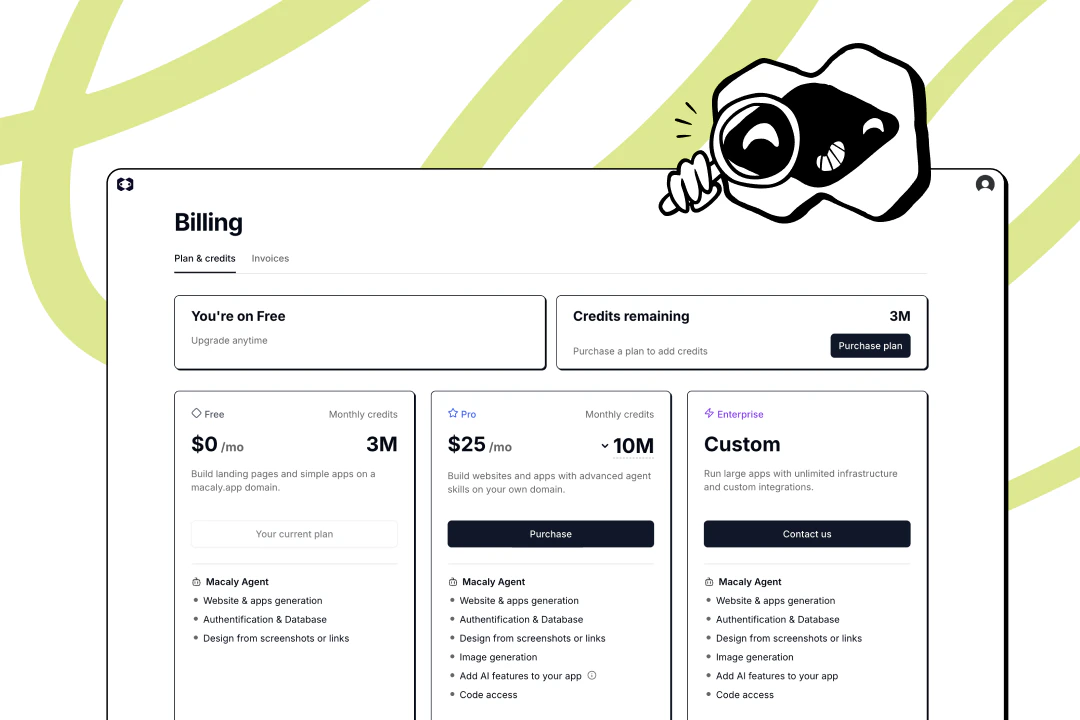
What changed
- The billing page is now completely redesigned and split into two tabs: Plan & credits and Invoices
- You can now buy one-time credit top-ups to keep building without upgrading your overall plan
- The credit counter was moved from the user menu into a new badge right inside your chat input
- Free plan users now get a 3 million credit monthly cap with no daily limits
New features
Ask Macaly about your site’s traffic
Macaly can now read your website analytics. Ask things like “how many visitors did I get this week?” or “what are my top pages?” and the agent will pull the numbers and explain what they mean.Rename your Macaly subdomain by asking
You can now tell Macaly to give your project a better URL. Just say something like “rename my subdomain to something nicer” and the agent will suggest and apply a new one. It knows where your site is published and updates it directly from the chat.Give your apps a voice
Macaly can now generate spoken audio from text. Describe what you want narrated and pick a voice style, and the agent produces an audio file. Use it to add a ‘listen to this article’ player to your blog, build audio flashcards, or create interactive voice onboarding flows.Improvements
- The live preview now automatically recovers when the development server crashes or restarts during a build
- The SEO setup flow now gives unconfigured projects a clear starting point and automatically generates a favicon and social image during setup
- The chat mode switcher shows the active mode and a short description
Bug fixes
- AI-generated images now get descriptive, unique filenames based on your prompt instead of all sharing the same generic name
- Older published projects now display the correct live URL in deployment settings instead of occasionally showing the wrong subdomain
New features
Track your usage and credits
The Usage & Limits panel now shows a clear breakdown of how your credits are being spent by skill and by project. A progress bar tracks your monthly total so you always know where you stand. This makes it easier to manage your budget as you scale your tools.
Add voice and audio to your apps
Macaly can now add a transcription step to the tools you build. Use it to create a meeting note taker, a voice-to-text dashboard, or a tool that turns voice memos into blog posts. Just describe how you want to handle audio and the agent will set it up to process files or public links.Better images with Nano Banana 2
The agent now uses the Nano Banana 2 model to generate and edit images in your projects. When you update an existing image, Macaly automatically detects the right aspect ratio so the new version fits perfectly into your design.Improvements
- The error panel now surfaces only what’s actually worth fixing
- Favicon uploads now support more file formats (e.g. JPG, PNG)
Bug fixes
- Long conversations with lots of screenshots are now more stable
- Custom logos now stay the correct size across your app instead of occasionally displaying too large
- The welcome screen is no longer blocked by a stray error message when you start a new chat
New features
Turn any YouTube video into content
Paste a YouTube link and Macaly will watch it for you. Use what it learned to build a page, write a blog post, structure a FAQ, or anything else based on what’s in the video - without rewriting everything from scratch.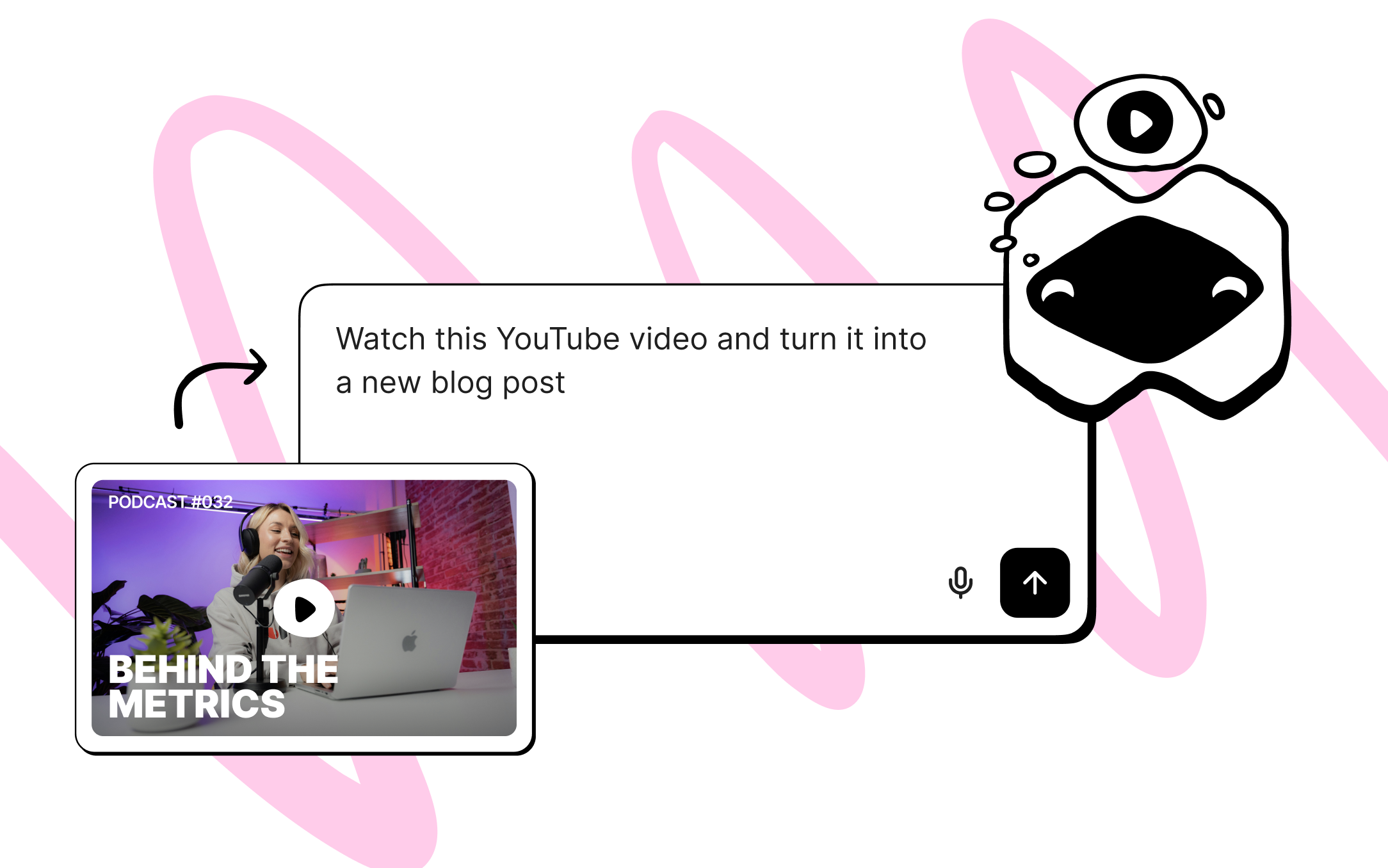
Add AI to your own app
Macaly can now make your app smart. Ask it to add a chatbot, automate responses, or generate content. Just describe how you want to use AI in your project and the agent handles the rest.Improvements
- We simplified the workspace, and settings for API keys, domains, and usage are now all in one place
- A new Send Feedback button lets you report bugs or share ideas directly from the app
- GitHub is now accessible via the + button in chat (Pro)
New features
Message queues
You can now send messages while the agent is still working. Messages are added to a queue and the agent picks them up automatically once it finishes the current task. Just type and send as you normally would — no need to wait.Sonnet 4.6
A new, more affordable model is now available. You can switch between Sonnet 4.6 and Opus in your settings, depending on whether you prefer lower cost or maximum capability.Keyboard shortcuts
- New
Cmd + .shortcut to switch between build and plan mode - New
Cmd + Shift + Spaceshortcut for voice input - Fixed the voice shortcut — it can now also be used to stop recording
New agent capabilities
Opus 4.6
The agent now runs on Claude Opus 4.6, the latest model from Anthropic. It better understands what you want, makes fewer mistakes, and produces better results.
Long-running tasks
The agent can now work on bigger tasks for up to 1 hour without stopping or timing out. You can describe the full scope of what you need and let it handle everything at once.Agent memory
The agent now remembers your preferences across conversations. Tell it once what colors, layout, or fonts you prefer, and it applies them automatically in future chats.Agent understands your project
You can ask the agent how any part of your project works. Ask about login, checkout flow, or navigation and it explains it in simple, clear language.In-product navigation
Not sure where to find something? The agent can guide you directly inside the product. Ask it where to add your domain or how to manage your team.Connected to documentation
The agent is now connected to the Macaly documentation. If you’re not sure how something works, just ask and it finds the answer directly from the docs.New agent capabilities
Better design output
The agent now produces cleaner, more polished interfaces with better spacing, layout, and overall visual quality. You can also ask it to improve an existing design and it refines it step by step.
Icons and images
The agent can now find icons in SVG or PNG and place them directly in your project. You describe what you need and it handles the rest.Improved CSV handling
Working with CSV files is now more reliable. The agent reads the data better and displays it in your app as tables, lists, or dashboards.Separate testing database
Production and testing data can now be separated. You can create a testing database to make changes without touching live data. The testing database starts as a copy of production data, so you can safely try changes, adjust features, or test data updates. All edits apply only to the database you currently have selected.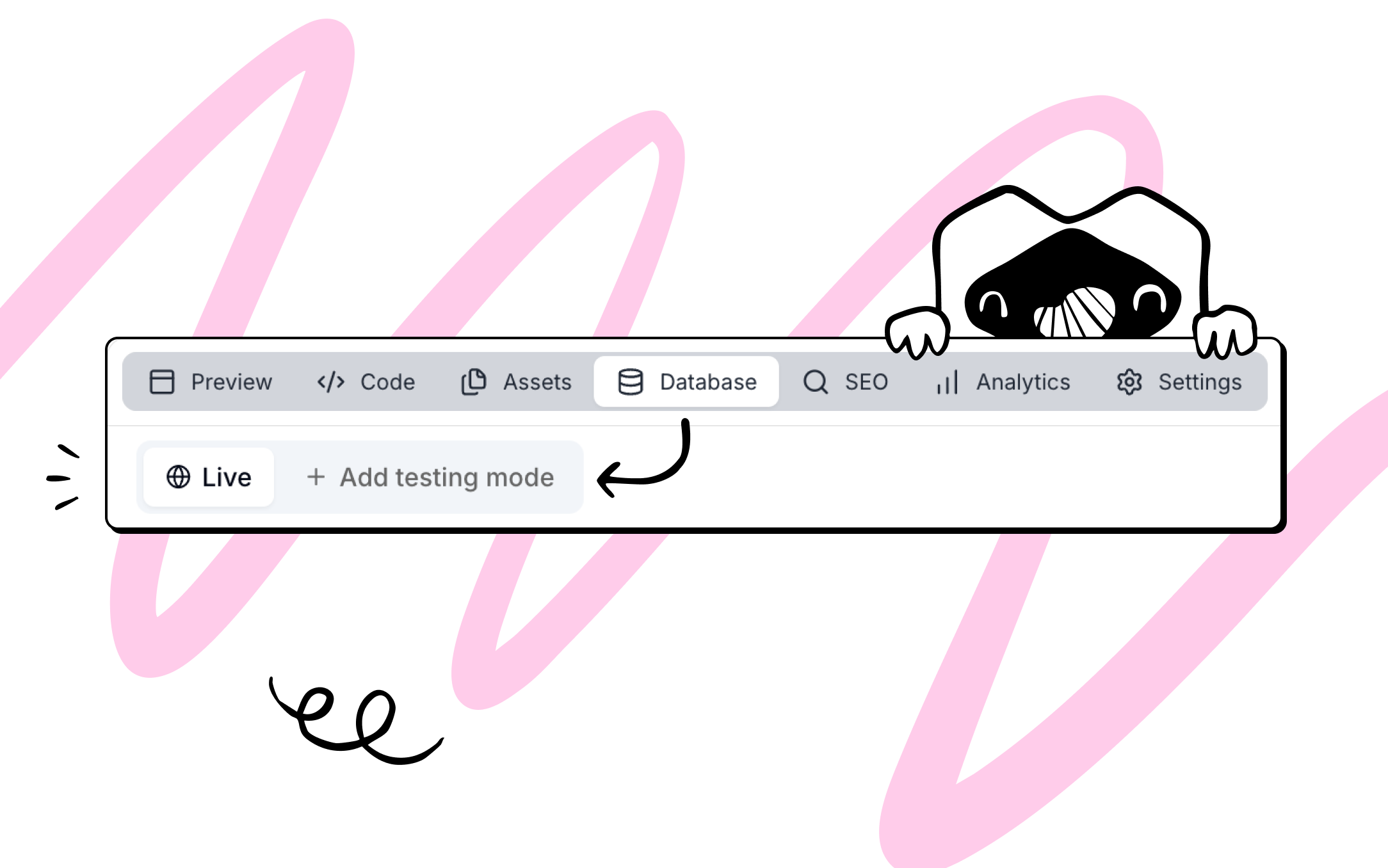
Improved GitHub pull behavior
Pulling changes from GitHub now updates the current chat, instead of creating a new one. All files will be replaced with the version from GitHub, while environment (.env) files remain unchanged.You can also disconnect GitHub from a chat using the new disconnect option, without needing to contact support.Macaly API (Agency)
Macaly is now available via an API on the Agency plan. You can create chat sessions, build web applications with AI, monitor progress, and deploy to production programmatically. Read the docs
Smarter model selection
Macaly now uses more capable models by default, primarily Opus 4.5, with GPT-5.2 as a fallback for tasks Opus can’t handle. This improves results on more complex or edge-case requests.
Improvements
- Deployments now show the correct status when your app is already live
- Better stability for projects using 3D and interactive components
- Fixed extra blank lines appearing when editing user messages
- General design and layout improvements across team management and settings
Bug fixes
- Fixed cases where the chat could freeze or repeat errors
- Improved typing and visibility in the chat input on smaller screens
- Fixed cases where sidebar search results could persist unexpectedly after closing and reopening the sidebar
Human-in-the-loop confirmations
Before the agent completes a response, it can now pause to confirm intent or ask follow-up questions when context is missing. This helps avoid incorrect or overly broad changes and gives you more control over larger actions.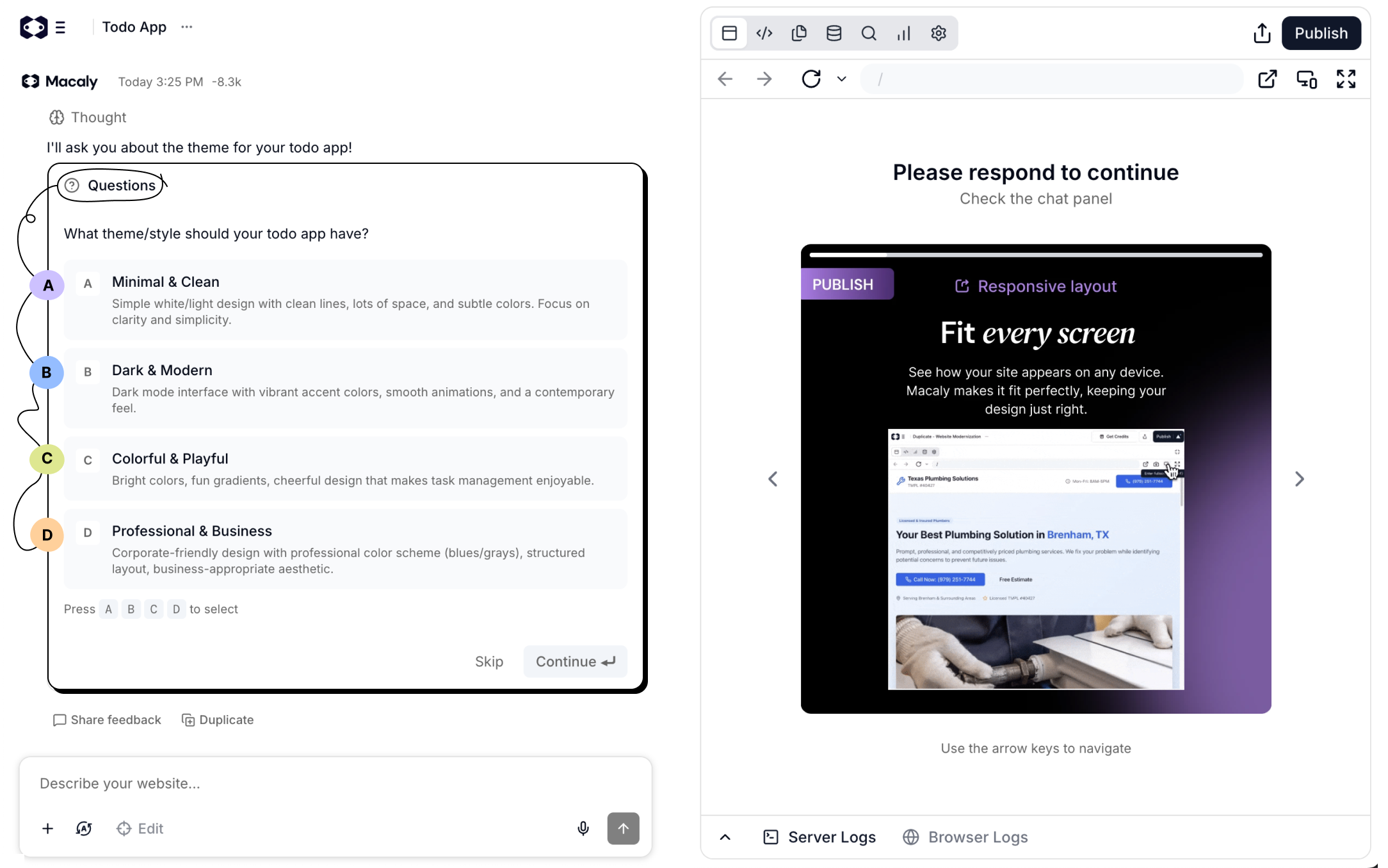
Planning mode
Macaly can now plan its work before executing it. The agent automatically decides when planning is needed, and you can also turn it on manually in the input box to review the approach first.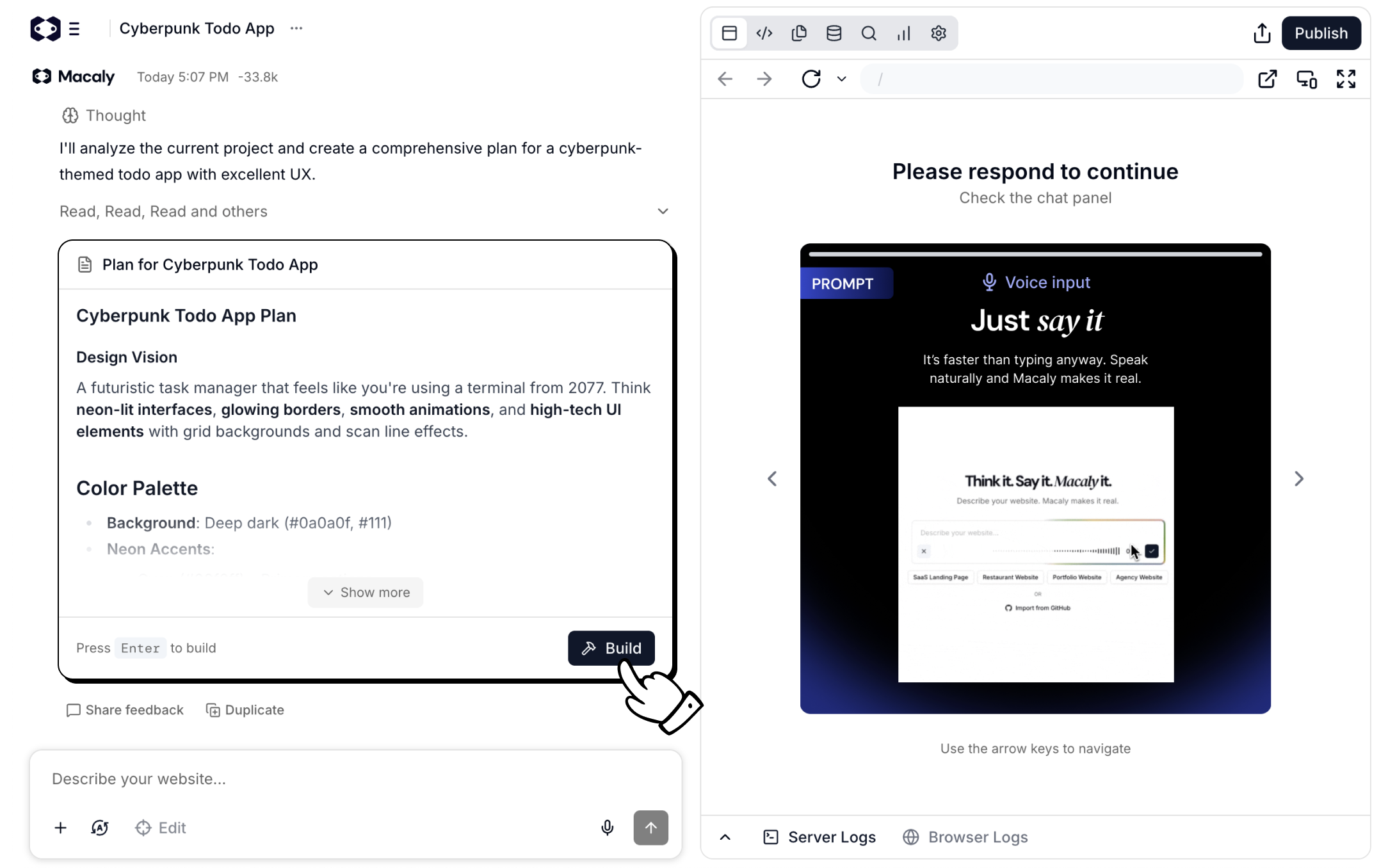
Duplicating a chat now creates an isolated copy
When you duplicate a chat, Macaly now creates a fully separate copy with its own data. You can experiment freely without worrying about changes affecting the original project.Improvements
- Sidebar refactor with lazy loading and server-side search for faster navigation
- Published apps and domains management moved into the Team dropdown
- Chat sidebar dropdown updated with quick access to documentation, settings, billing, help, and logout
Bug fixes
- Fixed an issue where the chat got stuck and repeatedly looped error states
- Fixed an issue where the screenshot tool sometimes failed to capture external websites
- Improved ChatInput responsiveness on devices with small screen heights and larger text
Media Assets (upload & reuse)You can now upload and manage any type of media directly in Macaly. Uploaded assets are stored in a shared library, and the agent can reference and reuse them while building or editing your project.More reliable background AI actionsThe Macaly agent now runs more reliably in the background and can handle longer, more complex tasks without stopping unexpectedly. This means you can let the agent work for longer periods of time and trust it to finish multi-step actions without needing to restart or break them into smaller pieces.Improved Assets UXWorking with uploaded assets is now faster and clearer, with improved browsing and handling inside the editor.Diff Mode: undo for blocksDiff Mode now supports undoing block-level changes, making it easier to review and safely revert edits made by the AI.Billing page authenticationThe billing page now correctly handles user authentication, improving reliability around plan changes and upgrades.Security updates (Next.js)We rolled out a large security upgrade for projects using older Next.js versions. Macaly now detects vulnerable versions, guides users to fix them, and auto-upgrades projects where possible.
Edit Mode updatesEdit Mode received several improvements:
- Theme presets
- Font change support
- Better overall design consistency
Global Styles (first version)You can now define global styles for your project. The first release focuses on colors using Tailwind themes, laying the foundation for consistent design across pages.Community launchThe Macaly Community is live. Explore real projects built by other users and get inspiration for your own builds. 👉 https://www.macaly.com/communityTeam collaborationTeams are now supported. You can invite collaborators to a workspace and share credits across the team.AI-powered editing inside Edit ModeYou can now use AI directly inside Edit Mode to:
- Rewrite text
- Replace images
- Remove elements
- Select parent element
- Remove elements directly in preview
- Clear edit mode behavior
- Better visibility without background tint
New Image Edit capabilitiesYou can now replace images, resize them, and adjust opacity directly inside Edit Mode.Background removal for imagesThe agent can remove backgrounds from AI-generated images as well as uploaded or external images (for example from Pexels).SEO improvements
- Global OG image and favicon support
- Per-page OG image overrides
- Set up domains before publishing
- Better error handling during domain purchase
- Fixed multiple publishing and domain-related issues
- Clearer messaging around free credits
- Daily credit limits adjusted
- Usage is now visible directly in chat messages