

Available on all plans
Visual edits works on desktop only. The toolbar doesn’t appear on phones or in narrow browser windows.
The toolbar

- Edit design: Click any element to change its look, image, or layout.
- Edit text: Editable text is outlined, so you can click it and rewrite it.
- Annotation: Draw on the page to point at what you mean.
Edit design
When you turn on Edit design, the panel opens with Site styles, where you set fonts, corner radius, and colors for the whole site. Click an element on the page to open its settings. Text, images, and sections show the basic options first. Alignment, borders, shadow, spacing, and layout are under Advanced.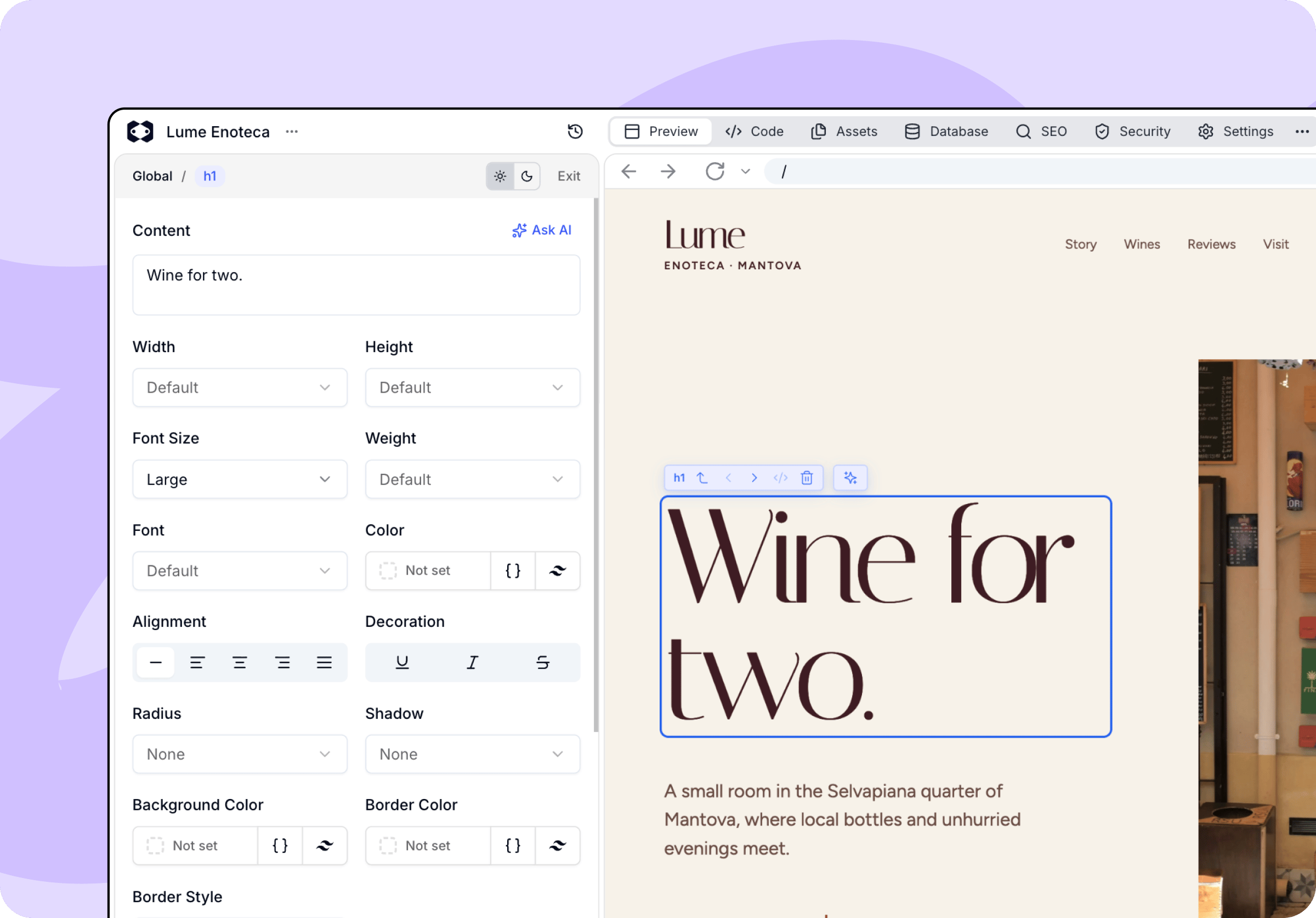
Reorder and adjust spacing
To move an element, select it and drag the handle below it to a new spot, for example to swap two cards. You can also use the arrow keys. To change spacing, drag the handles at the bottom of the selected element. Both changes are saved or discarded with the rest of your edits.Elements move only within their own group. Items generated from a list, such as products or blog posts, can’t be dragged. Ask the agent to reorder them instead.
Edit text
Text you can rewrite is outlined directly in the preview. Click into it and type. This is the fastest way to fix a headline or a paragraph, because you see the result in place as you write.Annotation
Sometimes it’s quicker to show the agent what you mean than to describe it. With Annotation on, draw over the part of the page you’re talking about. Macaly works out which elements sit under your mark and attaches them to your next message. Draw as many marks as you need, then type your message and send it as usual. While you’re drawing, Undo, Redo, and Clear are right there in the toolbar.
Save or discard your design changes before you start annotating, and keep the preview at the same size while you draw. Resizing it clears your marks, because they’re anchored to where the content was.
Navigating between elements
Clicking exactly what you want isn’t always possible, usually when elements overlap or a child covers its parent. A small bar above your selection lets you step up a level or sideways through neighboring elements. It’s also where you’ll find the code icon, which opens that element’s source in the Code tab, and the option to remove the element entirely.Edit with AI
For text and images, the panel also lets you describe a change instead of configuring it. Rewrite with AI rewrites the text from your prompt. Generate with AI edits the current image or creates a new one, and you preview the result before keeping it. With an element selected, the chat composer also switches to editing that element. Anything you write there applies only to your current selection.The AI buttons in the panel and prompts sent from the composer use credits like any other AI request, and the panel shows the price before you run them. Anything you set by hand in the panel is free.
Saving your changes
While you have unsaved changes, the toolbar shows how many you’ve made, and you can save or discard them all at once.
When the toolbar isn’t available
The toolbar hides itself, or grays out, when direct editing wouldn’t work:- Wait for Macaly to finish: The agent is still working on your project.
- Waiting for the preview to be ready: Your preview is still starting up.
- Close the plan to edit the page: You have a plan open in the chat.