How to build a website with AI for a small business
An AI website builder can turn a description of your business into a working site in about ten minutes. This guide covers the six steps that get it ready to publish, shown on an example site for a wedding florist built in Macaly.

Macaly
Building a website with AI takes six steps, and none of them need code:
- Write down what your business offers and what the website should do.
- Describe your business to the AI in your first message.
- Ask for changes to the design and photos in plain words.
- Add an inquiry form that saves every request.
- Help Google find your site.
- Publish the site on your own domain.
The example is Fernhill Flower Studio, a small wedding and event florist in Columbus, Ohio. We built its site in Macaly, an AI builder for websites and apps. Each step shows what we asked for and what came out of it.
Step 1: Write down what you already know
The Macaly AI agent writes the code and the copy, but it only knows your business from what you tell it. Before the first prompt, spend a few minutes on notes like these:
- What you offer and to whom. Fernhill does flowers for weddings and events, plus weekly arrangements for local businesses.
- What makes you different. For Fernhill, that’s seasonal, mostly locally grown flowers and a free consultation before every wedding.
- Where you work and when: the neighborhoods you serve, your hours and your contact details.
- The one job the website has. Fernhill’s site should bring in wedding and event inquiries.
The more specific your notes, the closer the first version gets to what you have in mind.
Step 2: Describe your business in the first prompt
Put your notes into one message. Fernhill’s first prompt looked like this:
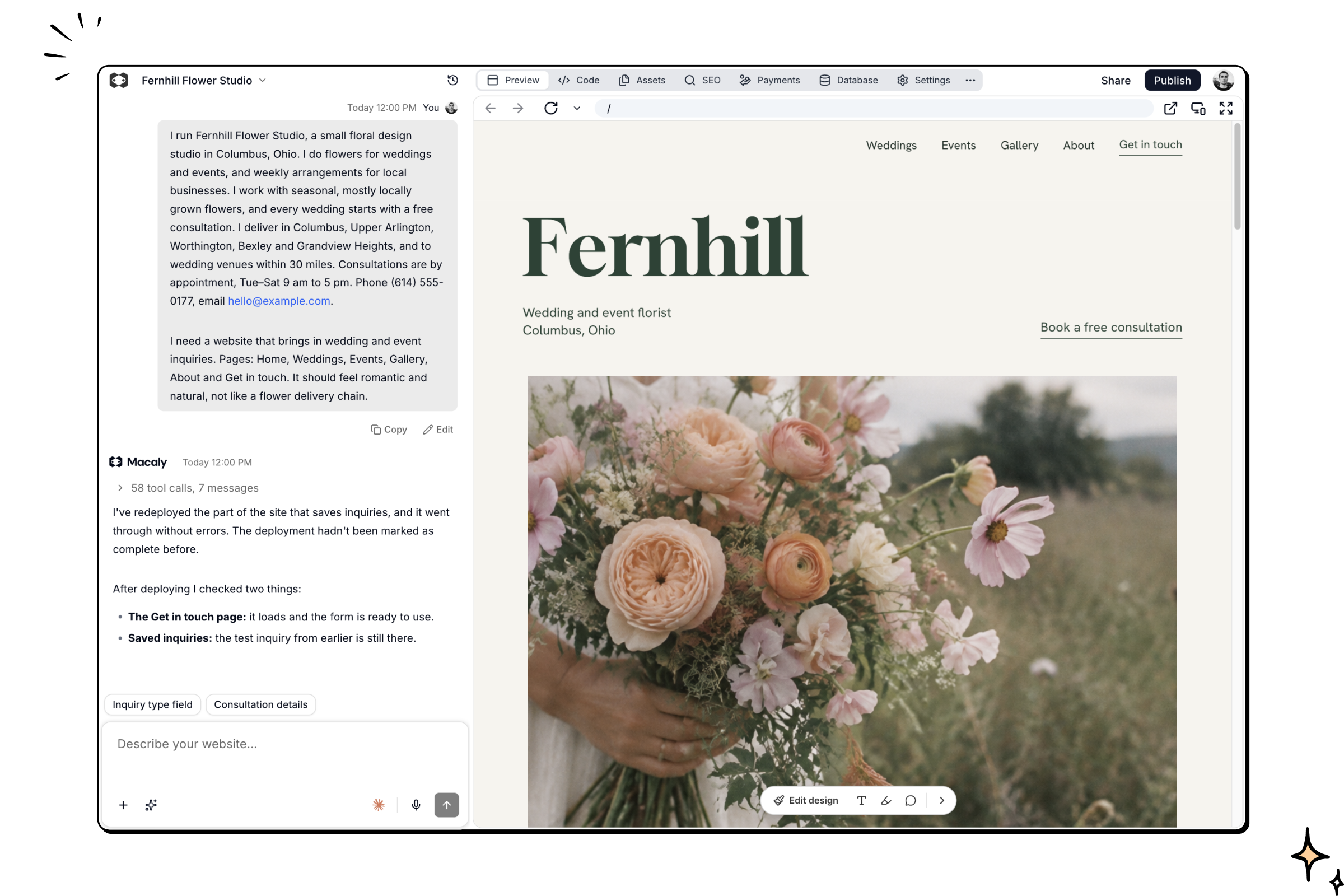
I run Fernhill Flower Studio, a small floral design studio in Columbus, Ohio. I do flowers for weddings and events, and weekly arrangements for local businesses. I work with seasonal, mostly locally grown flowers, and every wedding starts with a free consultation. I deliver in Columbus, Upper Arlington, Worthington, Bexley and Grandview Heights, and to wedding venues within 30 miles. Consultations are by appointment, Tue–Sat 9 am to 5 pm. Phone (614) 555-0177, email hello@example.com. I need a website that brings in wedding and event inquiries. Pages: Home, Weddings, Events, Gallery, About and Get in touch. It should feel romantic and natural, not like a flower delivery chain.
Within about ten minutes, the first version was ready: all six pages, a set of photos, a calm cream and moss green design, a mobile menu, and page titles and descriptions for Google.
You can also start from something that already exists. Macaly can pull your photos, opening hours, address and reviews from your Google Maps profile, and it asks for your go-ahead before it fetches anything. A public LinkedIn profile works well for a personal or portfolio site. If you have a design you like, a screenshot or a sketch is enough for the agent to match its style.
Already have a website?
Then you don’t need to create a website with AI from scratch. Paste the link to your current site into the chat. Macaly takes its content and layout and rebuilds the site as a new version. You decide what stays and what changes, for example:
Rebuild my website [link]. Keep all the services and contact details, but give it a cleaner, more modern look.
You’ll find more on the website redesign page.
Step 3: Ask for changes in plain words
Once the first version is ready, you keep shaping it in the same chat. Write to the agent the way you’d brief a designer:
- Describe the result you want. Say what the site should look or feel like, for example “warmer” or “more editorial”. The agent works out the fonts, colors, spacing and layout.
- Name what to change. “Make the headings feel less formal” gives the agent more to work with than “make it better”.
- Share a reference. A screenshot or a link to a site you like is often quicker than describing the style in words.
- Send one request at a time. Focused messages are easier to review, and you can return to any earlier version from the version history.
- Compare directions side by side. Ask the agent to try a different look as a variant. You can switch between both versions before you decide which one to publish.
For Fernhill, we asked for photos in one consistent style and for animations that play as visitors scroll the homepage.
Small text changes don’t need the agent at all. Click any text in the preview and change it directly, without using credits.
Step 4: Add an inquiry form
Ask the agent for an inquiry form that saves every request. On Fernhill’s site, the owner gets an email about each new inquiry. She also has a private page with all inquiries, where she marks each one as booked or declined. She signs in to it with a code sent to her email. Couples can attach inspiration photos to their inquiry.
The form was ready within a few minutes. The agent tested it with a sample inquiry and checked that it was saved and that the email went out.
Step 5: Help Google find your site
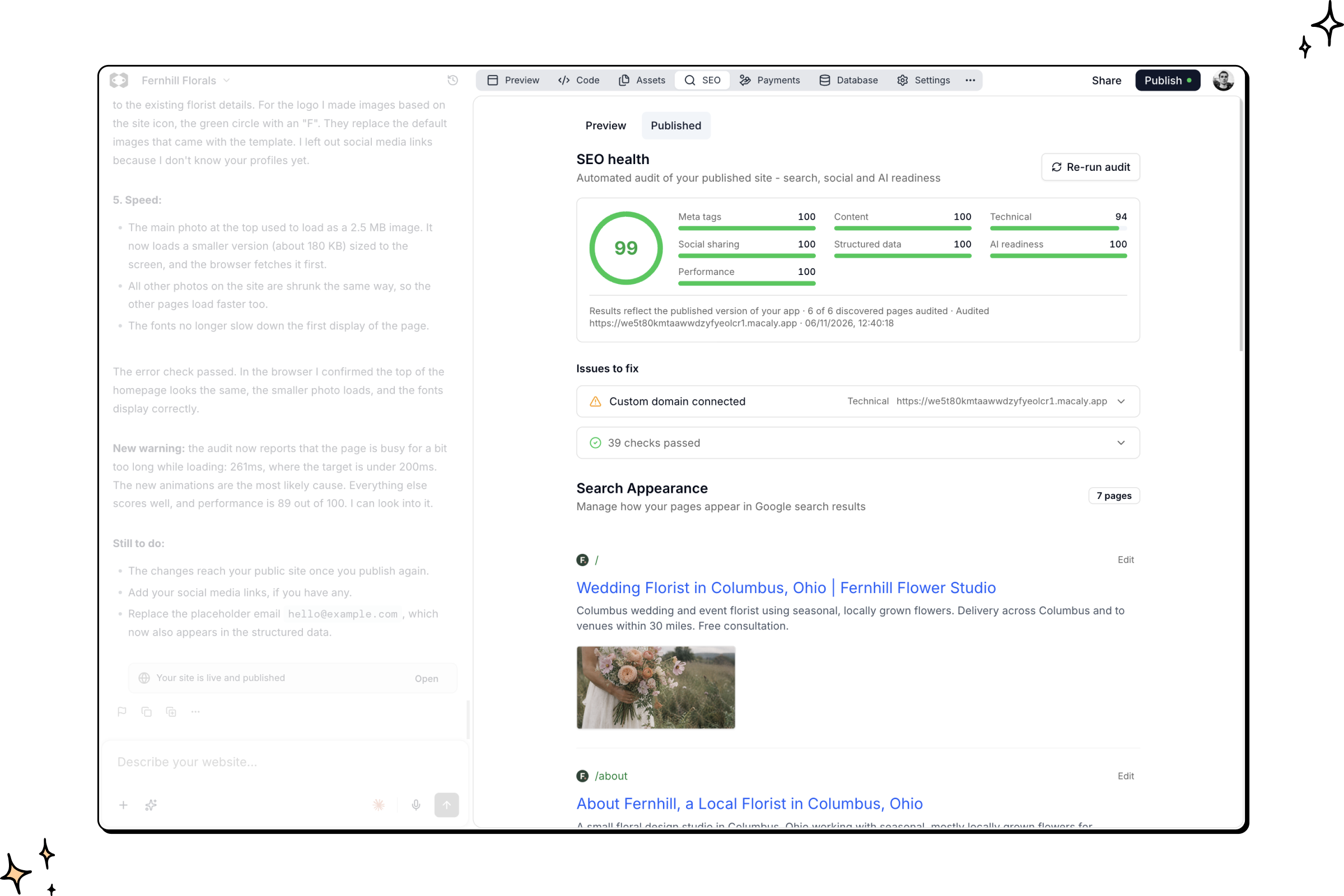
Tell the agent which searches you want to show up for. For Fernhill, those were “wedding florist Columbus Ohio” and “florist near me”. The agent gave every page its own title and description with local terms. The homepage title became “Wedding Florist in Columbus, Ohio | Fernhill Flower Studio”. It also worked the search phrases into the text without stuffing them in, and added a section listing the delivery areas.
On top of that, the agent added structured data, a short description of the business that Google can read, with the delivery area and opening hours. Pages that only the owner should see stay hidden from search engines.
Some of this Macaly does for every project. Pages are rendered on the server, so Google and AI search tools see the full content right away. On the Pro and Agency plans, an SEO audit scores the published site and suggests what to improve.
For local searches like “florist near me”, the agent also recommended a Google Business Profile with the same hours and phone number as the website. It often counts as much as the site itself.
Step 6: Publish on your own domain
Before you publish:
- Go through every page on your phone. Layouts adapt to phones by default, but it’s worth a look.
- Read all the text and check the prices and contact details.
- Send a test inquiry and make sure the email arrives.
Publishing takes one click, and the site goes live on a free Macaly address. To use your own domain, you need the Starter plan or higher. You can connect a domain you already own or buy a new one inside Macaly.
How long does it take to build a website with AI?
In our case, the first version took about ten minutes. Fernhill’s site was ready to publish after about an hour and twenty minutes and 11 messages, most of them about the design and photos. How long yours takes depends mostly on how many changes you want.
How much does it cost to build a website with AI?
You can try Macaly for free, and the Free plan lets you publish one site on a Macaly address. To put a site on your own domain, the Starter plan costs $10 per month, and the domain is paid separately. See pricing for what each plan includes.
What’s still up to you
The agent handles the building. These parts depend on you:
- Photos of your real work. Generated photos are fine to start with, but customers will want to see what you actually make.
- Real reviews and quotes from your customers.
- A Google Business Profile, which matters a lot for local searches.
- What makes you different. The agent can only put on the site what you tell it.
How to start
Open Macaly and describe your business in the first message, using your notes from step 1. If you already have a website, paste its link instead.