> ## Documentation Index
> Fetch the complete documentation index at: https://www.macaly.com/docs/llms.txt
> Use this file to discover all available pages before exploring further.
# Domains & hosting
> Learn how to publish your site and use free or custom domains
Publishing makes your project available on the internet. Macaly handles hosting, deployment, and SSL for you, so you don’t need to configure servers or connect third-party services.
## **What is a domain?**
A domain is the address people type into their browser to visit your website, like [example.com](http://example.com).
Think of it as the public name of your site. When someone opens that address, their browser loads the content of your project. In Macaly, you don’t need to set this up upfront. Publishing your project automatically gives you a working domain so your site is immediately accessible.
## **Free Macaly subdomain**
Every published Macaly project goes live on a free Macaly subdomain, for example:
```
https://myproject.macaly-app.com
```
This lets you go online instantly. You can use this link to preview your site, share it with others, or launch without worrying about domains or hosting. You can keep using the Macaly subdomain or switch to a custom domain later without changing your project.
## **Custom domain**
A custom domain is a branded address like [example.com](http://example.com).
If you want your site to live on your own domain, Macaly gives you two options:
* Connect a domain you already own from any registrar
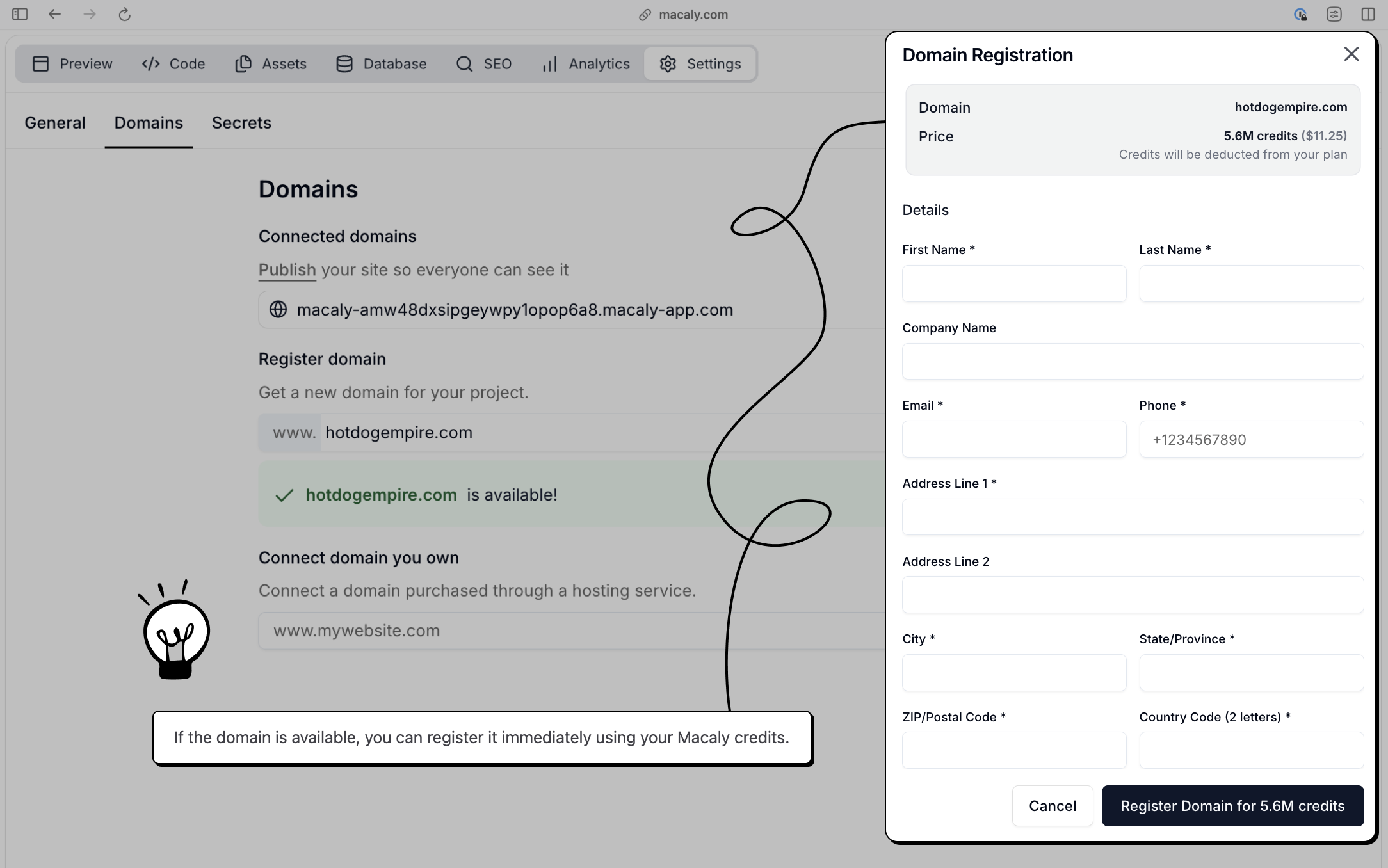
* Buy and register a new domain directly inside Macaly using credits
Macaly is part of the [team.blue ecosystem](https://team.blue/ecosystem/), which includes trusted local hosting and domain providers across Europe such as Active24 (CZ), Websupport (SK), Combell (BE), Register.it (IT), and many more. If you need a domain registrar, these are a natural fit.
## **How to Publish your Web or App**
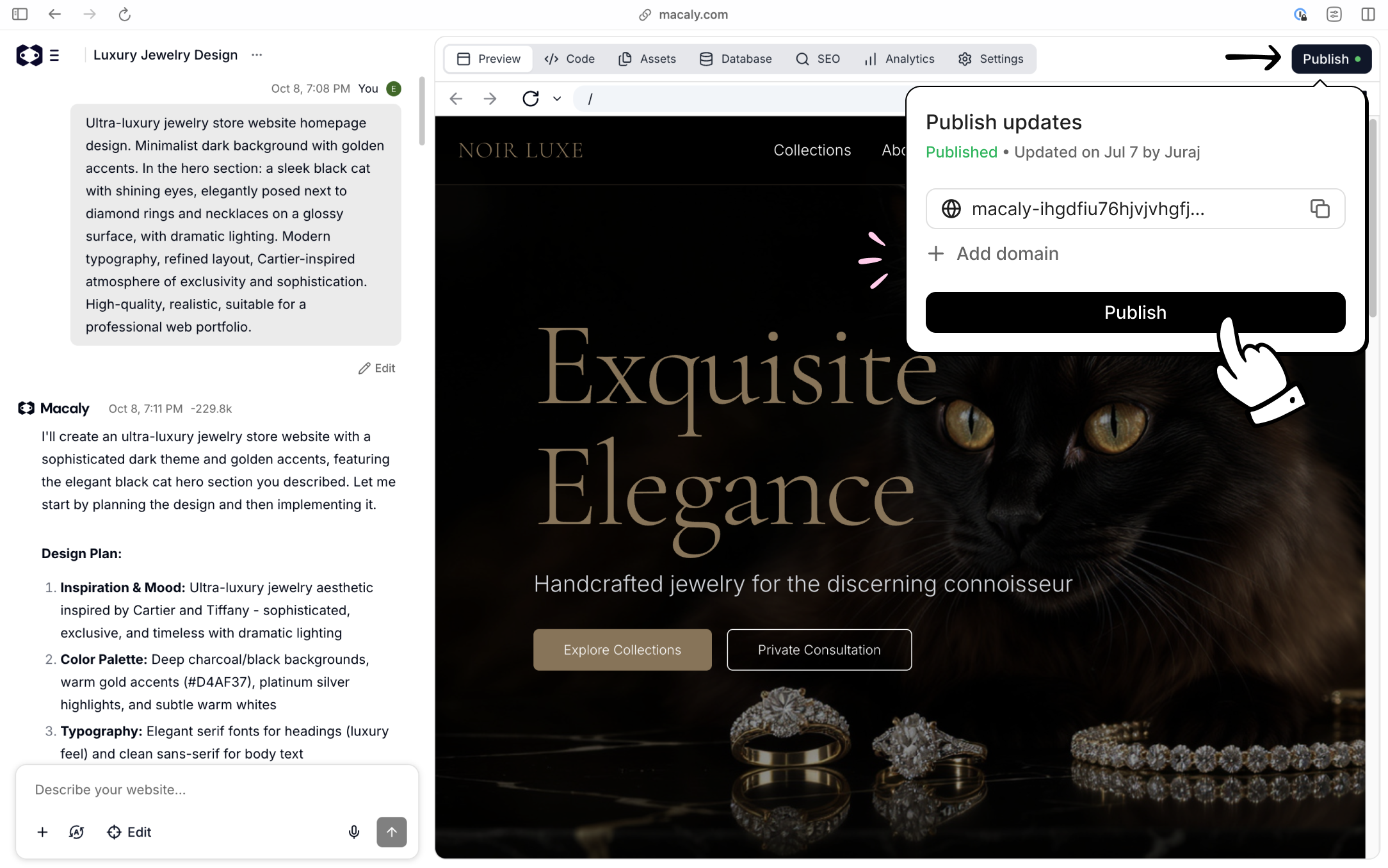
Click **Publish** in the top-right corner of the editor. Macaly builds and deploys the latest version of your project automatically.
Once publishing finishes, your site is live on a free Macaly subdomain and ready to be shared or connected to a custom domain.
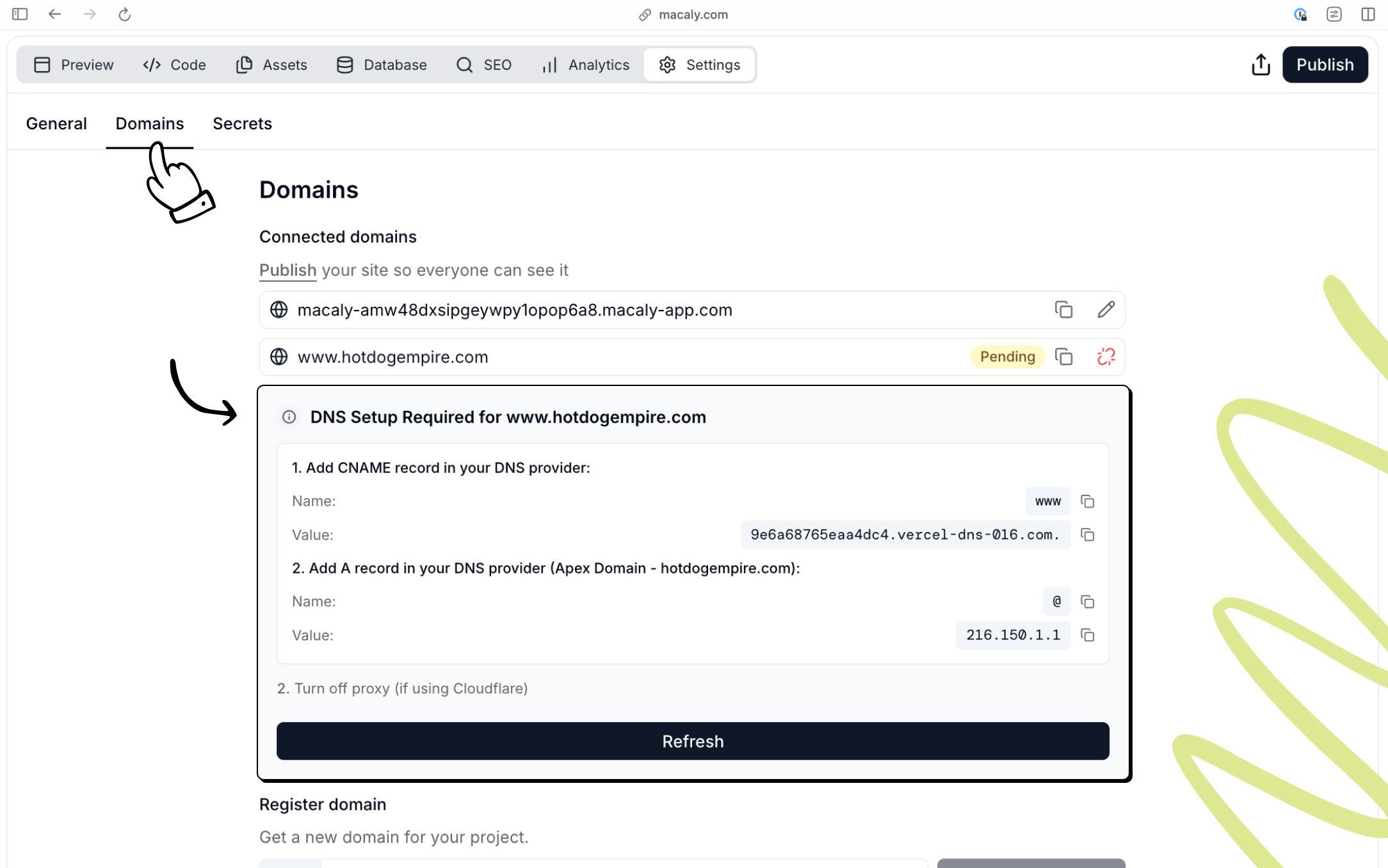
 Open **Settings → Domains**, enter your domain, and click **Connect**. Macaly will show you the exact DNS records you need to add. Copy these values into your domain provider’s DNS settings.
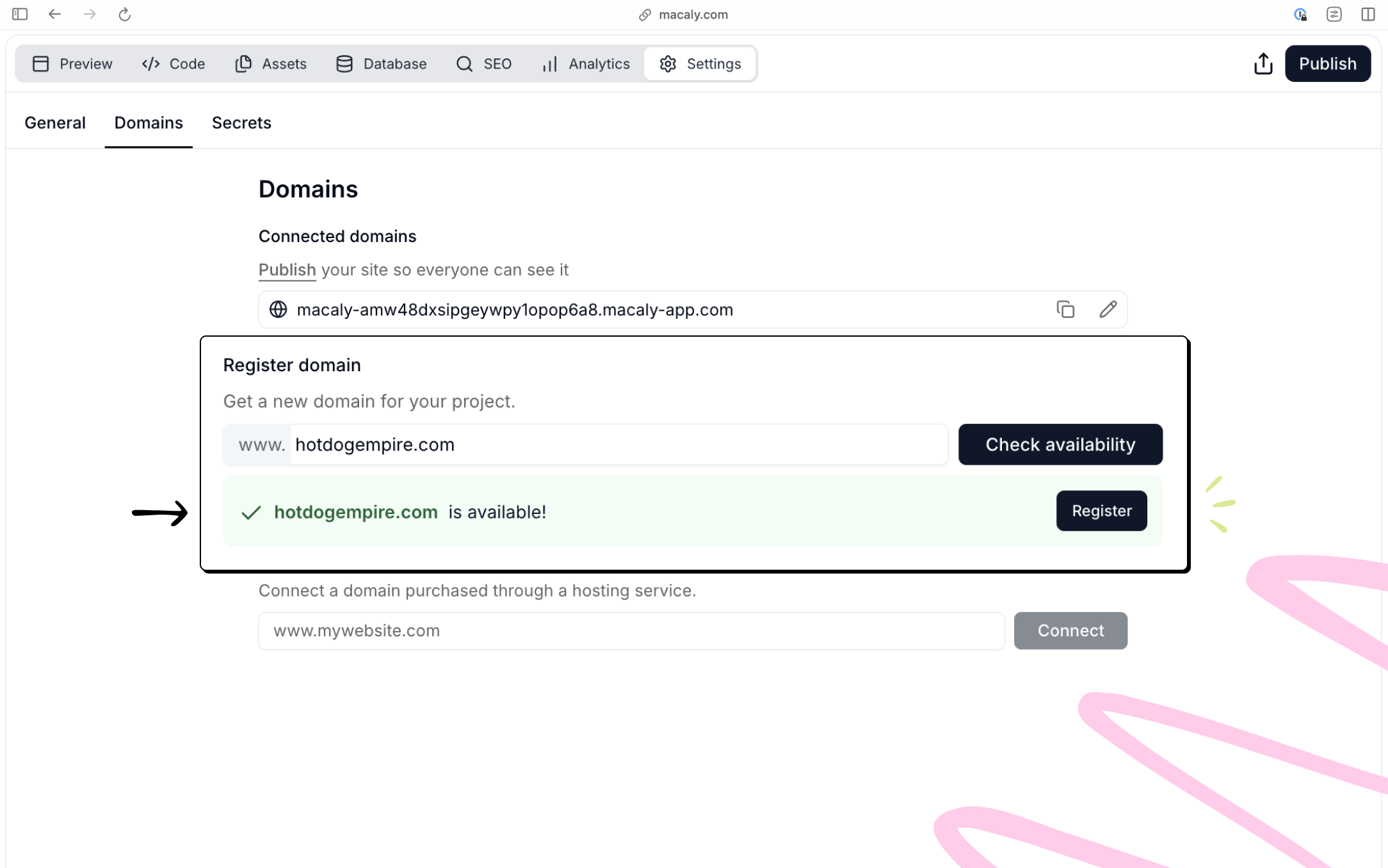
 Open **Settings → Domains**, search for a domain name, and check availability.
 ## **Hosting**
Macaly handles hosting and deployment for you, powered by **Vercel**. When you publish a project, it’s deployed automatically, served securely over HTTPS, and optimized for performance and SEO by default. You don’t need to manage servers, SSL certificates, or a separate hosting provider.
## **Hosting plan**
If you only need to keep a site live on a single custom domain without using AI credits, you can use the [**Hosting plan**](/en/welcome/pricing#hosting-plan) (\$5/month). This plan is designed for simple, long-running websites where you just want reliable hosting without ongoing edits or AI usage. It is only available as a downgrade from a Pro plan.
## **Frequently asked questions**
In your project, go to **Settings → Domains**, type your domain name, and click **Connect**. Macaly will show the DNS records you need to add. Go to your domain registrar and add the A record and CNAME record as shown. After saving the records, return to Macaly and click **Refresh**. Connecting a custom domain requires a Pro or Hosting plan.
You typically need two records:
* An **A record** for the root domain pointing to Macaly's IP address
* A **CNAME record** for `www` pointing to Macaly's hostname
The exact values are shown in **Settings → Domains** when you add your domain.
Add an A record for the bare/apex domain pointing to Macaly's IP address (`216.150.1.1`). Remove any existing conflicting A or AAAA records for the root domain. [Contact support](mailto:support@macaly.com) if you are unsure which records to remove.
Double-check that the DNS records at your registrar exactly match what Macaly shows. Remove any conflicting records. Click **Refresh** in the Macaly Domains panel. DNS propagation can take up to 24 hours.
No. The Hosting plan is not available on the Free plan. To use the Hosting plan, you need to upgrade to a Pro plan first.
Macaly does not provide email hosting. For email on your custom domain (e.g. [info@yoursite.com](mailto:info@yoursite.com)), sign up with a third-party provider such as Google Workspace, Zoho, or Microsoft 365, and configure their MX records with your registrar. Once you have an email address, the Macaly agent can set up contact forms to send notifications to it.
## **Hosting**
Macaly handles hosting and deployment for you, powered by **Vercel**. When you publish a project, it’s deployed automatically, served securely over HTTPS, and optimized for performance and SEO by default. You don’t need to manage servers, SSL certificates, or a separate hosting provider.
## **Hosting plan**
If you only need to keep a site live on a single custom domain without using AI credits, you can use the [**Hosting plan**](/en/welcome/pricing#hosting-plan) (\$5/month). This plan is designed for simple, long-running websites where you just want reliable hosting without ongoing edits or AI usage. It is only available as a downgrade from a Pro plan.
## **Frequently asked questions**
In your project, go to **Settings → Domains**, type your domain name, and click **Connect**. Macaly will show the DNS records you need to add. Go to your domain registrar and add the A record and CNAME record as shown. After saving the records, return to Macaly and click **Refresh**. Connecting a custom domain requires a Pro or Hosting plan.
You typically need two records:
* An **A record** for the root domain pointing to Macaly's IP address
* A **CNAME record** for `www` pointing to Macaly's hostname
The exact values are shown in **Settings → Domains** when you add your domain.
Add an A record for the bare/apex domain pointing to Macaly's IP address (`216.150.1.1`). Remove any existing conflicting A or AAAA records for the root domain. [Contact support](mailto:support@macaly.com) if you are unsure which records to remove.
Double-check that the DNS records at your registrar exactly match what Macaly shows. Remove any conflicting records. Click **Refresh** in the Macaly Domains panel. DNS propagation can take up to 24 hours.
No. The Hosting plan is not available on the Free plan. To use the Hosting plan, you need to upgrade to a Pro plan first.
Macaly does not provide email hosting. For email on your custom domain (e.g. [info@yoursite.com](mailto:info@yoursite.com)), sign up with a third-party provider such as Google Workspace, Zoho, or Microsoft 365, and configure their MX records with your registrar. Once you have an email address, the Macaly agent can set up contact forms to send notifications to it.