> ## Documentation Index
> Fetch the complete documentation index at: https://www.macaly.com/docs/llms.txt
> Use this file to discover all available pages before exploring further.
# Macaly Agent
Macaly's agent builds websites and apps for you. You describe what you want in plain language, and the agent figures out how to make it happen.
## What is an agent?
If you've used ChatGPT or similar tools, you're already familiar with chatbots.
You ask a question, it gives you an answer. That's where it stops.
An agent is different. It takes action.
Think of it this way:
* A chatbot will tell you how to order pizza.
* An agent checks restaurants, compare prices, place the order, and let you know when it arrives.
Macaly's agent works the same way, except it builds websites and apps instead of ordering pizza.
## Modes
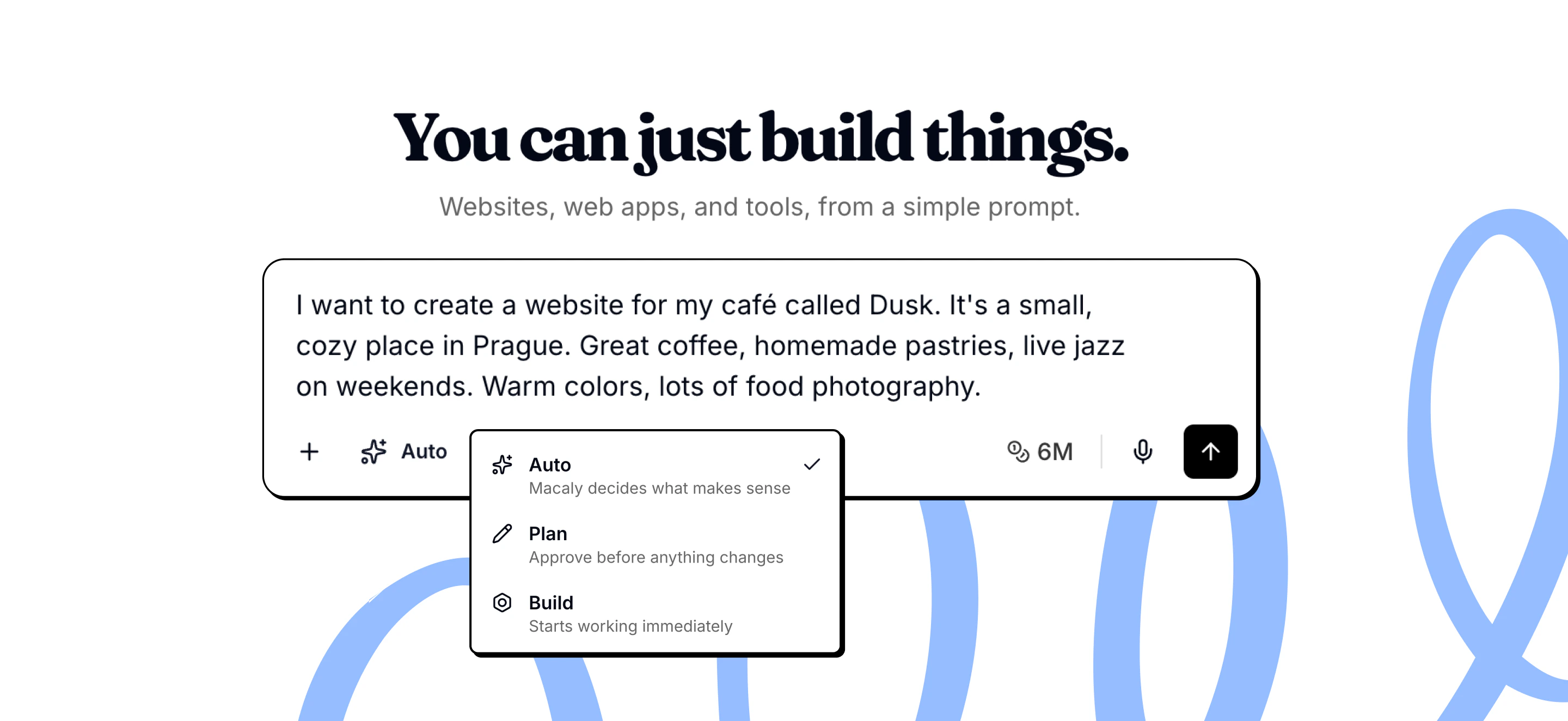
Macaly has 3 modes that control how the agent handles your requests:
* **Build:** Builds immediately without asking questions. Best if you know exactly what you want.
* **Plan:** Creates a plan or asks clarifying questions before building. Use when the task is complex or you want to review the approach first.
* **Auto (default)**: Decides when to plan and when to build. Simple requests are built right away, complex ones trigger planning or questions.
You can switch modes directly in the chat using the mode selector next to the input field.
 ## Agent abilities
The agent acts as a collaborator who can plan, ask questions, research, and build your app from start to finish.
For complex features, the agent breaks your request into steps and shows you the plan first. You can review and approve before anything is built.
Instead of guessing, the agent pauses to ask focused questions. This means the result matches what you actually want.
The agent keeps context from earlier in your project, so changes stay consistent with choices you made before.
If the agent needs current information, examples, or documentation, it looks them up on the web.
When you share a URL, the agent can understand the structure and design to use as reference or inspiration.
It finds high-quality stock photos that fit your project, like hero images, backgrounds, or lifestyle shots.
Generates new images, edits existing ones, or removes backgrounds when stock photos don’t fit.
You don't need to touch code. The agent updates pages, content, layout, and functionality based on what you ask for.
Before finishing, the agent reviews what it built to catch mistakes or missing details.
## AI Models
Macaly uses a combination of AI models optimized for quality and reliability:
* OpenAI: GPT-5.6 Sol, GPT-5.6 Terra
* Anthropic: Opus 4.6, Sonnet 4.6, Sonnet 5
* Macaly Code and BlueAI for cheap, fast work
The agent runs in a secure sandbox environment and has access to real development tools. It can browse the internet, reason about structure, iterate on solutions, and improve projects without constant manual prompting.
## Frequently asked questions
If the agent shows no progress for more than 10 to 15 minutes, try duplicating the chat using **Start Fresh (No Messages)**. This usually resolves the issue. If not, [contact support](mailto:support@macaly.com) with the chat link. Any credits consumed during a confirmed stuck session will be reviewed and returned.
When reporting an error, be as specific as possible. Describe what you were doing before the error, what you see now, what is not working, and what the correct behavior should be. The more detail you provide, the better the agent can fix it on the first try.
Macaly has approximately 20 steps per user request. If your prompt is too complex, the agent may not complete everything. Break large requests into smaller sequential steps: send one specific change per message, verify it works, then move on.
Duplicate your chat whenever the project is in a good state, especially before making larger changes. Use **Keep Everything (With Messages)** to preserve the full chat history, or **Start Fresh (No Messages)** to carry over the project code without the chat history. Each duplicate has its own separate database.
Yes. Under any agent response in the chat, there is a **Restore this version** button. Clicking it reverts the project code to the state it was in when that response was generated.
## Agent abilities
The agent acts as a collaborator who can plan, ask questions, research, and build your app from start to finish.
For complex features, the agent breaks your request into steps and shows you the plan first. You can review and approve before anything is built.
Instead of guessing, the agent pauses to ask focused questions. This means the result matches what you actually want.
The agent keeps context from earlier in your project, so changes stay consistent with choices you made before.
If the agent needs current information, examples, or documentation, it looks them up on the web.
When you share a URL, the agent can understand the structure and design to use as reference or inspiration.
It finds high-quality stock photos that fit your project, like hero images, backgrounds, or lifestyle shots.
Generates new images, edits existing ones, or removes backgrounds when stock photos don’t fit.
You don't need to touch code. The agent updates pages, content, layout, and functionality based on what you ask for.
Before finishing, the agent reviews what it built to catch mistakes or missing details.
## AI Models
Macaly uses a combination of AI models optimized for quality and reliability:
* OpenAI: GPT-5.6 Sol, GPT-5.6 Terra
* Anthropic: Opus 4.6, Sonnet 4.6, Sonnet 5
* Macaly Code and BlueAI for cheap, fast work
The agent runs in a secure sandbox environment and has access to real development tools. It can browse the internet, reason about structure, iterate on solutions, and improve projects without constant manual prompting.
## Frequently asked questions
If the agent shows no progress for more than 10 to 15 minutes, try duplicating the chat using **Start Fresh (No Messages)**. This usually resolves the issue. If not, [contact support](mailto:support@macaly.com) with the chat link. Any credits consumed during a confirmed stuck session will be reviewed and returned.
When reporting an error, be as specific as possible. Describe what you were doing before the error, what you see now, what is not working, and what the correct behavior should be. The more detail you provide, the better the agent can fix it on the first try.
Macaly has approximately 20 steps per user request. If your prompt is too complex, the agent may not complete everything. Break large requests into smaller sequential steps: send one specific change per message, verify it works, then move on.
Duplicate your chat whenever the project is in a good state, especially before making larger changes. Use **Keep Everything (With Messages)** to preserve the full chat history, or **Start Fresh (No Messages)** to carry over the project code without the chat history. Each duplicate has its own separate database.
Yes. Under any agent response in the chat, there is a **Restore this version** button. Clicking it reverts the project code to the state it was in when that response was generated.